Programming in R



Overview
One of the main attractions of using the R (http://cran.at.r-project.org) environment is the ease with which users can write their own programs and custom functions. The R programming syntax is extremely easy to learn, even for users with no previous programming experience. Once the basic R programming control structures are understood, users can use the R language as a powerful environment to perform complex custom analyses of almost any type of data (Gentleman 2008).
Why Programming in R?
- Powerful statistical environment and programming language
- Facilitates reproducible research
- Efficient data structures make programming very easy
- Ease of implementing custom functions
- Powerful graphics
- Access to fast growing number of analysis packages
- One of the most widely used languages in bioinformatics
- Is standard for data mining and biostatistical analysis
- Technical advantages: free, open-source, available for all OSs
R Basics
The previous Rbasics tutorial provides a general introduction to the usage of the R environment and its basic command syntax. More details can be found in the R & BioConductor manual here.
Code Editors for R
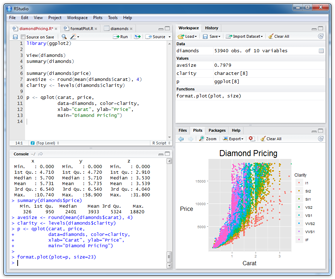
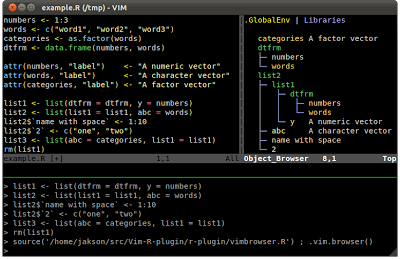
Several excellent code editors are available that provide functionalities like R syntax highlighting, auto code indenting and utilities to send code/functions to the R console.
- RStudio: GUI-based IDE for R
- Vim-R-Tmux: R working environment based on vim and tmux
- Emacs (ESS add-on package)
- gedit and Rgedit
- RKWard
- Eclipse
- Tinn-R
- Notepad++ (NppToR)
Finding Help
Reference list on R programming (selection)
- Advanced R, by Hadley Wickham
- R Programming for Bioinformatics, by Robert Gentleman
- S Programming, by W. N. Venables and B. D. Ripley
- Programming with Data, by John M. Chambers
- R Help & R Coding Conventions, Henrik Bengtsson, Lund University
- Programming in R (Vincent Zoonekynd)
- Peter’s R Programming Pages, University of Warwick
- Rtips, Paul Johnsson, University of Kansas
- R for Programmers, Norm Matloff, UC Davis
- High-Performance R, Dirk Eddelbuettel tutorial presented at useR-2008
- C/C++ level programming for R, Gopi Goswami
R Scripts
R programming involves the writing of R scripts, which are text files containing R code. The file name of an R script carries the extension .R (e.g. myscript.R). Typically, R scripts are composed of code sections, as well as comments (starting with #) explaining what the code does.
The structure and styling requirements of R scripts are not very strict. However, for maintainability and readability, it is highly recommended to follow widely adopted styling recommendations. For details on how to best and consistently format R scripts, this style guide is a good start. In addition, the formatR package is very helpful.
In addition to executing the code in R scripts interactively, e.g. line by line, one can execute R scripts as a whole with execution commands from the R console or the command-line using source or Rscript, respectively. The details on how to execute R scripts are explained in this section.
R Markdown (Rmd) and Quarto (qmd) scripts are an extension of R scripts that include in addition to R code, results and commentary text. Both can be rendered to a variety formats including HTML and PDF. They are explained in a separate tutorial here. R packages are often built for organizing more complex R code and providing usage instructions in the form of help files and vignettes (manuals). How to build R packages is explained in the R Package tutorial of this website.
The code in R scripts (or Rmd/qmd scripts) should be organized as much as possible in R functions that are called (used) somewhere in the script. Alternatively, functions can be organized in a secondary R script from where they are imported with the source command. This makes the code more concise, readable and reusable.
Control Structures
Important Operators
Comparison operators
==(equal)!=(not equal)>(greater than)>=(greater than or equal)<(less than)<=(less than or equal)
Logical operators
&(and)&&(and)|(or)||(or)!(not)
Note: & and && indicate logical AND, while | and || indicate logical OR. The shorter form performs element-wise comparisons of same-length vectors. The longer form evaluates left to right examining only the first element of each vector (can be of different lengths). Evaluation proceeds only until the result is determined. The longer form is preferred for programming control-flow, e.g. via if clauses.
Conditional Executions: if Statements
An if statement operates on length-one logical vectors.
Syntax
In the else component, avoid inserting newlines between } else.
Example
Example 2
Conditional Executions: ifelse Statements
The ifelse statement operates on vectors.
Syntax
Example
Loops
for loop
for loops iterate over elements of a looping vector.
Syntax
Example
mydf <- iris
myve <- NULL
for(i in seq(along=mydf[,1])) {
    myve <- c(myve, mean(as.numeric(mydf[i,1:3])))
}
myve[1:8]
[1] 3.333333 3.100000 3.066667 3.066667 3.333333 3.666667 3.133333 3.300000Note: Inject into objecs is much faster than append approach with c, cbind, etc.
Example
myve <- numeric(length(mydf[,1]))
for(i in seq(along=myve)) {
    myve[i] <- mean(as.numeric(mydf[i,1:3]))
}
myve[1:8]
[1] 3.333333 3.100000 3.066667 3.066667 3.333333 3.666667 3.133333 3.300000Conditional Stop of Loops
The stop function can be used to break out of a loop (or a function) when a condition becomes TRUE. In addition, an error message will be printed.
Example
while loop
Iterates as long as a condition is true.
Syntax
Example
The apply Function Family
apply
Syntax
Arguments
X:array,matrixordata.frameMARGIN:1for rows,2for columnsFUN: one or more functionsARGs: possible arguments for functions
Example
tapply
Applies a function to vector components that are defined by a factor.
Syntax
Example
sapply, lapply and vapply
The iterator functions sapply, lapply and vapply apply a function to vectors or lists. The lapply function always returns a list, while sapply returns vector or matrix objects when possible. If not then a list is returned. The vapply function returns a vector or array of type matching the FUN.VALUE. Compared to sapply, vapply is a safer choice with respect to controlling specific output types to avoid exception handling problems.
Examples
$a
[1] 5.5

$beta
[1] 4.535125

$logic
[1] 0.5 a beta logic
5.500000 4.535125 0.500000 a beta logic
5.500000 4.535125 0.500000 Often used in combination with a function definition:
Programming Exercise on Loops: go here
Improving Speed Performance of Loops
Looping over very large data sets can become slow in R. However, this limitation can be overcome by eliminating certain operations in loops or avoiding loops over the data intensive dimension in an object altogether. The latter can be achieved by performing mainly vector-to-vecor or matrix-to-matrix computations. These vectorized operations run in R often over 100 times faster than the corresponding for() or apply() loops. In addition, one can make use of the existing speed-optimized C-level functions in R, such as rowSums, rowMeans, table, and tabulate. Moreover, one can design custom functions that avoid expensive R loops by using vector- or matrix-based approaches. Alternatively, one can write programs that will perform all time consuming computations on the C-level.
The following code samples illustrate the time-performance differences among the different approaches of running iterative operations in R.
1. for loop with append versus inject approach
The following runs a for loop where the result is appended in each iteration with the c() function. The corresponding cbind and rbind for two dimensional data objects would have a similar performance impact as c().
Now the for loop is run with an inject approach for storing the results in each iteration.
As one can see from the output of system.time, the inject approach is 20-50 times faster.
2. apply loop versus rowMeans
The following performs a row-wise mean calculation on a large matrix first with an apply loop and then with the rowMeans function.
Based on the results from system.time, the rowMeans approach is over 200 times faster than the apply loop.
3. apply loop versus vectorized approach
In this example row-wise standard deviations are computed with an apply loop and then in a vectorized manner.
system.time(myMAsd <- apply(myMA, 1, sd))
   user  system elapsed
  3.707   0.014   3.721
myMAsd[1:4]
        1         2         3         4
0.8505795 1.3419460 1.3768646 1.3005428

system.time(myMAsd <- sqrt((rowSums((myMA-rowMeans(myMA))^2)) / (length(myMA[1,])-1)))
   user  system elapsed
  0.020   0.009   0.028

myMAsd[1:4]
        1         2         3         4
0.8505795 1.3419460 1.3768646 1.3005428
The vector-based approach in the last step is over 200 times faster than the apply loop.
4. Example of fast querying routine applied to a large matrix
(a) Create a sample matrix
The following lfcPvalMA function creates a test matrix containing randomly generated log2 fold changes (LFCs) and p-values (here: pval or FDRs) for variable numbers of samples or test results. In biology this dataset mimics the results of an analysis of differentially expressed genes (DEGs) from several contrasts arranged in a single matrix (or data.frame).
lfcPvalMA <- function(Nrow=200, Ncol=4, stats_labels=c("lfc", "pval")) {
    set.seed(1410)
    assign(stats_labels[1], runif(n = Nrow * Ncol, min = -4, max = 4))
    assign(stats_labels[2], runif(n = Nrow * Ncol, min = 0, max = 1))
    lfc_ma <- matrix(lfc, Nrow, Ncol, dimnames=list(paste("g", 1:Nrow, sep=""), paste("t", 1:Ncol, "_", stats_labels[1], sep="")))
    pval_ma <- matrix(pval, Nrow, Ncol, dimnames=list(paste("g", 1:Nrow, sep=""), paste("t", 1:Ncol, "_", stats_labels[2], sep="")))
    statsMA <- cbind(lfc_ma, pval_ma)
    return(statsMA[, order(colnames(statsMA))])
}
degMA <- lfcPvalMA(Nrow=200, Ncol=4, stats_labels=c("lfc", "pval"))
dim(degMA)
[1] 200 8 t1_lfc t1_pval t2_lfc t2_pval t3_lfc t3_pval t4_lfc t4_pval
g1 -1.8476368 0.39486484 1.879310 0.7785999 0.1769551 0.9904342 0.1747932 0.9536679
g2 0.2542926 0.04188993 -1.629778 0.6379570 -1.9280792 0.6106041 -2.3599518 0.1950022
g3 3.4703657 0.73881357 2.047794 0.3129176 -3.8891714 0.1508787 3.7811606 0.2560303
g4 -2.8548158 0.99201512 -2.710385 0.1772805 1.0920515 0.2826038 3.9313225 0.5519854(b) Organize results in list
To filter the results efficiently, it is usually best to store the two different stats (here lfc and pval) in separate matrices (here two) where each has the same dimensions and row/column ordering. Note, in this case a list is used to store the two matrices.
(c) Combinatorial filter
With the above generated data structure of two complementary matrices it is easy to apply combinatorial filtering routines that are both flexible and time-efficient (fast). The following example queries for fold changes of at least 2 (here lfc >= 1 | lfc <= -1) plus p-values of 0.5 or lower. Note, all intermediate and final results are stored in logical matrices. In addition to boolean comparisons, one can apply basic mathematical operations, such as calculating the sum of each cell across many matrices. This returns a numeric matix of integers representing the counts of TRUE values in each position of the considered logical matrices. Subsequently, one can perform summary and filtering routines on these count-based matrices which is convenient when working with large numbers of matrices. All these matrix-to-matrix comparisons are very fast to compute and require zero looping instructions by the user.
(d) Extract query results
- Retrieve row labels (genes) that match the query from the previous step in each column, and store them in a
list.
matchingIDlist <- sapply(colnames(queryResult), function(x) names(queryResult[queryResult[ , x] , x]), simplify=FALSE)
matchingIDlist
$t1
[1] "g1" "g2" "g5" "g6" "g11" "g16" "g18" "g19" "g21" "g23" "g24" "g31" "g36" "g37" "g41" "g46" "g60" "g61" "g63" "g70" "g71" "g72" "g75" "g81" "g83" "g84" "g88" "g91" "g97" "g98"
[31] "g100" "g102" "g103" "g104" "g110" "g111" "g112" "g113" "g114" "g120" "g121" "g123" "g124" "g126" "g130" "g134" "g135" "g139" "g140" "g145" "g147" "g153" "g157" "g158" "g159" "g160" "g162" "g170" "g171" "g172"
[61] "g173" "g175" "g178" "g183" "g184" "g187" "g190" "g192" "g196" "g199"
$t2
[1] "g4" "g5" "g7" "g9" "g10" "g12" "g16" "g23" "g34" "g35" "g39" "g41" "g44" "g46" "g47" "g48" "g49" "g50" "g51" "g52" "g56" "g66" "g75" "g80" "g81" "g85" "g88" "g89" "g90" "g94"
[31] "g99" "g102" "g112" "g115" "g116" "g118" "g119" "g120" "g129" "g144" "g145" "g148" "g152" "g155" "g156" "g160" "g164" "g165" "g167" "g168" "g170" "g172" "g178" "g186" "g187" "g194" "g197"
$t3
[1] "g3" "g6" "g7" "g9" "g12" "g15" "g23" "g25" "g26" "g27" "g38" "g43" "g52" "g53" "g54" "g58" "g66" "g69" "g72" "g76" "g77" "g80" "g84" "g85" "g86" "g88" "g89" "g90" "g91" "g99"
[31] "g100" "g107" "g110" "g122" "g124" "g125" "g129" "g134" "g139" "g141" "g143" "g144" "g146" "g148" "g154" "g163" "g165" "g171" "g173" "g178" "g180" "g182" "g188" "g190" "g193" "g195"
$t4
[1] "g2" "g5" "g7" "g8" "g9" "g12" "g13" "g15" "g20" "g21" "g26" "g28" "g30" "g31" "g36" "g37" "g38" "g47" "g63" "g64" "g65" "g67" "g68" "g69" "g76" "g77" "g80" "g85" "g90" "g98"
[31] "g99" "g101" "g105" "g106" "g120" "g123" "g125" "g126" "g129" "g131" "g134" "g137" "g140" "g143" "g147" "g148" "g153" "g155" "g157" "g165" "g167" "g170" "g171" "g172" "g174" "g175" "g176" "g178" "g181" "g182"
[61] "g188" "g192" "g199"- Return all row labels (genes) that match the above query across a specified number of columns (here 2). Note, the
rowSumsfunction is used for this, which performs the row-wise looping internally and extremely fast.
        t1    t2    t3    t4
g5    TRUE  TRUE FALSE  TRUE
g7   FALSE  TRUE  TRUE  TRUE
g9   FALSE  TRUE  TRUE  TRUE
g12  FALSE  TRUE  TRUE  TRUE
g23   TRUE  TRUE  TRUE FALSE
g80  FALSE  TRUE  TRUE  TRUE
g85  FALSE  TRUE  TRUE  TRUE
g88   TRUE  TRUE  TRUE FALSE
g90  FALSE  TRUE  TRUE  TRUE
g99  FALSE  TRUE  TRUE  TRUE
g120  TRUE  TRUE FALSE  TRUE
g129 FALSE  TRUE  TRUE  TRUE
g134  TRUE FALSE  TRUE  TRUE
g148 FALSE  TRUE  TRUE  TRUE
g165 FALSE  TRUE  TRUE  TRUE
g170  TRUE  TRUE FALSE  TRUE
g171  TRUE FALSE  TRUE  TRUE
g172  TRUE  TRUE FALSE  TRUE
g178 TRUE TRUE TRUE TRUE [1] "g5" "g7" "g9" "g12" "g23" "g80" "g85" "g88" "g90" "g99" "g120" "g129" "g134" "g148" "g165" "g170" "g171" "g172" "g178"As demonstrated in the above query examples, by setting up the proper data structures (here two matrices with same dimensions), and utilizing vectorized (matrix-to-matrix) operations along with R’s built-in row* and col* stats function family (e.g. rowSums) one can design with very little code flexible query routines that also run very time-efficient.
Functions
Function Overview
A very useful feature of the R environment is the possibility to expand existing functions and to easily write custom functions. In fact, most of the R software can be viewed as a series of R functions.
Syntax to define function
Syntax to call functions
The value returned by a function is the value of the function body, which is usually an unassigned final expression, e.g.: return()
Function Syntax Rules
General
- Functions are defined by
- The assignment with the keyword
function - The declaration of arguments/variables (
arg1, arg2, ...) - The definition of operations (
function_body) that perform computations on the provided arguments. A function name needs to be assigned to call the function.
- The assignment with the keyword
Naming
- Function names can be almost anything. However, the usage of names of existing functions should be avoided.
Arguments
- It is often useful to provide default values for arguments (e.g.:
arg1=1:10). This way they don’t need to be provided in a function call. The argument list can also be left empty (myfct <- function() { fct_body }) if a function is expected to return always the same value(s). The argument...can be used to allow one function to pass on argument settings to another.
Body
- The actual expressions (commands/operations) are defined in the function body which should be enclosed by braces. The individual commands are separated by semicolons or new lines (preferred).
Usage
- Functions are called by their name followed by parentheses containing possible argument names. Empty parenthesis after the function name will result in an error message when a function requires certain arguments to be provided by the user. The function name alone will print the definition of a function.
Scope
- Variables created inside a function exist only for the life time of a function. Thus, they are not accessible outside of the function. To force variables in functions to exist globally, one can use the double assignment operator:
<<-
Examples
Define sample function
Function usage
Apply function to values 2 and 5
Run without argument names
Makes use of default value 5
Print function definition (often unintended)
function (x1, x2 = 5)
{
    z1 <- x1/x1
    z2 <- x2 * x2
    myvec <- c(z1, z2)
    return(myvec)
}
<bytecode: 0x55c40df48008>
Programming Exercise on Functions: go here ../rprogramming/index.qmd#exercise-1)
Useful Utilities
Debugging Utilities
Several debugging utilities are available for R. They include:
tracebackbrowseroptions(error=recover)options(error=NULL)debug
The Debugging in R page provides an overview of the available resources.
Regular Expressions
R’s regular expression utilities work similar as in other languages. To learn how to use them in R, one can consult the main help page on this topic with ?regexp.
String matching with grep
The grep function can be used for finding patterns in strings, here letter A in vector month.name.
String substitution with gsub
Example for using regular expressions to substitute a pattern by another one using a back reference. Remember: single escapes \ need to be double escaped \\ in R.
Interpreting a Character String as Expression
Some useful examples
Generates vector of object names in session
Executes entry in position n as expression
Alternative approach
Replacement, Split and Paste Functions for Strings
Selected examples
Substitution with back reference which inserts in this example _ character
Split string on inserted character from above
Reverse a character string by splitting first all characters into vector fields
Check Integrity of Files
The integrity of files (e.g. after downloading or copying them) can be checked with md5sum (also see checkMD5sums).
Time, Date and Sleep
Selected examples
Return CPU (and other) times that an expression used (here ls)
Return the current system date and time
Pause execution of R expressions for a given number of seconds (e.g. in loop)
Example
Import of Specific File Lines with Regular Expression
The following example demonstrates the retrieval of specific lines from an external file with a regular expression. First, an external file is created with the cat function, all lines of this file are imported into a vector with readLines, the specific elements (lines) are then retieved with the grep function, and the resulting lines are split into vector fields with strsplit.
Calling External Software
External command-line software can be called with the system and system2 functions. The following example calls blastall from R.
Possibilities for Executing R Scripts
R console
The source command is used for executing an R script from the R console.
Command-line
The Rscript commmand is used to execute an R script from the command-line.
A shebang needs to be included at the beginning of an R script in order to execute it just by typing the name of the script (here ./myscript.R) after making it executable (see here for UNIX-like OSs). The shebang line is optional when executing R scripts from the R console with the source command or with Rscript from the command-line. The shebang of R scripts looks as follows:
#!/usr/bin/env Rscript
Older alternatives for executing R scripts from the command-line are given below.
Passing arguments from command-line to R
Create an R script named test.R with the following content:
Then run it from the command-line like this:
In the given example the number 10 is passed on from the command-line as an argument to the R script which is used to return to STDOUT the first 10 rows of the iris sample data. If several arguments are provided, they will be interpreted as one string and need to be split in R with the strsplit function. A more detailed example can be found here.
Building R Packages
This section has been moved to a dedicated tutorial on R package development here.
Programming Exercises
Exercise 1
for loop
Task 1.1: Compute the mean of each row in myMA by applying the mean function in a for loop.
myMA <- matrix(rnorm(500), 100, 5, dimnames=list(1:100, paste("C", 1:5, sep="")))
myve_for <- NULL
for(i in seq(along=myMA[,1])) {
    myve_for <- c(myve_for, mean(as.numeric(myMA[i, ])))
}
myResult <- cbind(myMA, mean_for=myve_for)
myResult[1:4, ]
C1 C2 C3 C4 C5 mean_for
1 -1.202619 -0.1053735 -1.1074995 0.4269033 -1.3932608 -0.67636998
2 1.174138 -0.8991985 -1.2658862 1.0151751 -0.4075398 -0.07666225
3 1.357860 -1.2370991 0.7402124 -1.0277818 0.4851062 0.06365953
4 1.173512 -1.2724114 0.2270477 -1.5421106 0.7484669 -0.13309912while loop
Task 1.2: Compute the mean of each row in myMA by applying the mean function in a while loop.
z <- 1
myve_while <- NULL
while(z <= length(myMA[,1])) {
    myve_while <- c(myve_while, mean(as.numeric(myMA[z, ])))
    z <- z + 1
}
myResult <- cbind(myMA, mean_for=myve_for, mean_while=myve_while)
myResult[1:4, -c(1,2)]
C3 C4 C5 mean_for mean_while
1 -1.1074995 0.4269033 -1.3932608 -0.67636998 -0.67636998
2 -1.2658862 1.0151751 -0.4075398 -0.07666225 -0.07666225
3 0.7402124 -1.0277818 0.4851062 0.06365953 0.06365953
4 0.2270477 -1.5421106 0.7484669 -0.13309912 -0.13309912Task 1.3: Confirm that the results from both mean calculations are identical
apply loop
Task 1.4: Compute the mean of each row in myMA by applying the mean function in an apply loop
myve_apply <- apply(myMA, 1, mean)
myResult <- cbind(myMA, mean_for=myve_for, mean_while=myve_while, mean_apply=myve_apply)
myResult[1:4, -c(1,2)]
C3 C4 C5 mean_for mean_while mean_apply
1 -1.1074995 0.4269033 -1.3932608 -0.67636998 -0.67636998 -0.67636998
2 -1.2658862 1.0151751 -0.4075398 -0.07666225 -0.07666225 -0.07666225
3 0.7402124 -1.0277818 0.4851062 0.06365953 0.06365953 0.06365953
4 0.2270477 -1.5421106 0.7484669 -0.13309912 -0.13309912 -0.13309912Avoiding loops
Task 1.5: When operating on large data sets it is much faster to use the rowMeans function
mymean <- rowMeans(myMA)
myResult <- cbind(myMA, mean_for=myve_for, mean_while=myve_while, mean_apply=myve_apply, mean_int=mymean)
myResult[1:4, -c(1,2,3)]
C4 C5 mean_for mean_while mean_apply mean_int
1 0.4269033 -1.3932608 -0.67636998 -0.67636998 -0.67636998 -0.67636998
2 1.0151751 -0.4075398 -0.07666225 -0.07666225 -0.07666225 -0.07666225
3 -1.0277818 0.4851062 0.06365953 0.06365953 0.06365953 0.06365953
4 -1.5421106 0.7484669 -0.13309912 -0.13309912 -0.13309912 -0.13309912To find out which other built-in functions for basic calculations exist, type ?rowMeans.
Exercise 2
Custom functions
Task 2.1: Use the following code as basis to implement a function that allows the user to compute the mean for any combination of columns in a matrix or data frame. The first argument of this function should specify the input data set, the second the mathematical function to be passed on (e.g. mean, sd, max) and the third one should allow the selection of the columns by providing a grouping vector.
myMA <- matrix(rnorm(100000), 10000, 10, dimnames=list(1:10000, paste("C", 1:10, sep="")))
myMA[1:2,]
C1 C2 C3 C4 C5 C6 C7 C8 C9 C10
1 0.1750576 -0.2826930 0.9290137 0.0830523803 1.4113331 -1.221849 -0.4663186 0.6170635 0.58305534 0.1716817
2 -0.8056727 0.1885557 0.4891758 -0.0003536156 0.8356054 1.406484 1.0363437 -0.1351562 0.09596605 0.4551591myList <- tapply(colnames(myMA), c(1,1,1,2,2,2,3,3,4,4), list)
names(myList) <- sapply(myList, paste, collapse="_")
myMAmean <- sapply(myList, function(x) apply(myMA[,x], 1, mean))
myMAmean[1:4,] C1_C2_C3 C4_C5_C6 C7_C8 C9_C10
1 0.27379276 0.0908453513 0.07537248 0.3773685
2 -0.04264706 0.7472451361 0.45059378 0.2755626
3 0.49411343 -0.4486259202 -0.08519687 1.0929435
4 0.06575562 -0.0007494971 0.07968924 -0.7374505Exercise 3
Nested loops to generate similarity matrices
Task 3.1: Create a sample list populated with character vectors of different lengths
setlist <- lapply(11:30, function(x) sample(letters, x, replace=TRUE))
names(setlist) <- paste("S", seq(along=setlist), sep="")
setlist[1:6]
$S1
[1] "b" "s" "o" "w" "w" "x" "s" "z" "d" "f" "b"
$S2
[1] "e" "w" "l" "y" "i" "l" "m" "q" "s" "r" "d" "s"
$S3
[1] "h" "i" "t" "d" "f" "c" "u" "r" "v" "a" "n" "t" "v"
$S4
[1] "o" "w" "c" "x" "c" "l" "a" "z" "c" "f" "n" "i" "j" "u"
$S5
[1] "a" "z" "b" "t" "p" "l" "u" "z" "q" "x" "y" "h" "l" "j" "e"
$S6
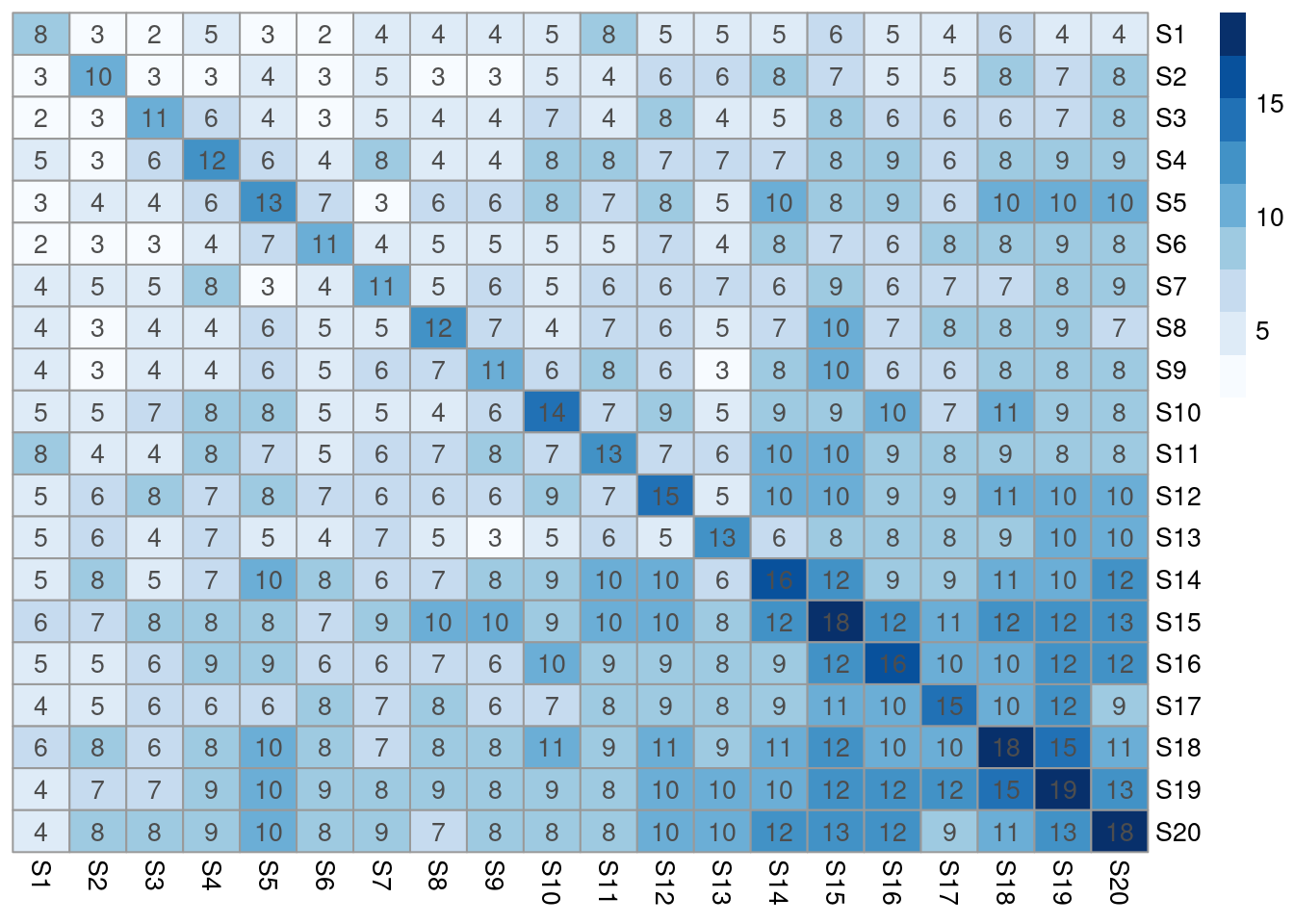
[1] "z" "v" "n" "v" "b" "m" "p" "p" "z" "g" "l" "j" "z" "z" "t" "e"Task 3.2: Compute the length for all pairwise intersects of the vectors stored in setlist. The intersects can be determined with the %in% function like this: sum(setlist[[1]] %in% setlist[[2]])
setlist <- sapply(setlist, unique)
olMA <- sapply(names(setlist), function(x) sapply(names(setlist),
               function(y) sum(setlist[[x]] %in% setlist[[y]])))
olMA[1:12,]
S1 S2 S3 S4 S5 S6 S7 S8 S9 S10 S11 S12 S13 S14 S15 S16 S17 S18 S19 S20
S1 8 3 2 5 3 2 4 4 4 5 8 5 5 5 6 5 4 6 4 4
S2 3 10 3 3 4 3 5 3 3 5 4 6 6 8 7 5 5 8 7 8
S3 2 3 11 6 4 3 5 4 4 7 4 8 4 5 8 6 6 6 7 8
S4 5 3 6 12 6 4 8 4 4 8 8 7 7 7 8 9 6 8 9 9
S5 3 4 4 6 13 7 3 6 6 8 7 8 5 10 8 9 6 10 10 10
S6 2 3 3 4 7 11 4 5 5 5 5 7 4 8 7 6 8 8 9 8
S7 4 5 5 8 3 4 11 5 6 5 6 6 7 6 9 6 7 7 8 9
S8 4 3 4 4 6 5 5 12 7 4 7 6 5 7 10 7 8 8 9 7
S9 4 3 4 4 6 5 6 7 11 6 8 6 3 8 10 6 6 8 8 8
S10 5 5 7 8 8 5 5 4 6 14 7 9 5 9 9 10 7 11 9 8
S11 8 4 4 8 7 5 6 7 8 7 13 7 6 10 10 9 8 9 8 8
S12 5 6 8 7 8 7 6 6 6 9 7 15 5 10 10 9 9 11 10 10Task 3.3 Plot the resulting intersect matrix as heat map. The image or the pheatmap functions can be used for this.
Exercise 4
Build your own R package
Task 4.1: Save one or more of your functions to a file called script.R and build the package with the package.skeleton function.
Task 4.2: Build tarball of the package
Task 4.3: Install and use package
Homework 4
See homework section here.
Additional Exercises
Pattern matching and positional parsing of equences
The following sample script patternSearch.R defines functions for importing sequences into R, retrieving reverse and complement of nucleotide sequences, pattern searching, positional parsing and exporting search results in HTML format. Sourcing the script will return usage instructions of its functions.
Identify over-represented strings in sequence sets
Example functions for finding over-represented words in sets of DNA, RNA or protein sequences are defined in this script: wordFinder.R. Sourcing the script will return usage instructions of its functions.
Object-Oriented Programming (OOP)
R supports several systems for object-oriented programming (OOP). This includes an older S3 system, and the more recently introduced R6 and S4 systems. The latter is the most formal version that supports multiple inheritance, multiple dispatch and introspection. Many of these features are not available in the older S3 system. In general, the OOP approach taken by R is to separate the class specifications from the specifications of generic functions (function-centric system). The following introduction is restricted to the S4 system since it is nowadays the preferred OOP method for package development in Bioconductor. More information about OOP in R can be found in the following introductions:
- Vincent Zoonekynd’s introduction to S3 Classes
- Christophe Genolini’s S4 Intro
- Advanced Bioconductor Courses
- Programming with R by John Chambers
- R Programming for Bioinformatics by Robert Gentleman
- Advanced R online book by Hadley Wichham
Define S4 Classes
1. Define S4 Classes with setClass() and new()
y <- matrix(1:10, 2, 5) # Sample data set
setClass(Class="myclass",
    representation=representation(a="ANY"),
    prototype=prototype(a=y[1:2,]), # Defines default value (optional)
    validity=function(object) { # Can be defined in a separate step using setValidity
        if(class(object@a)[1]!="matrix") {
            return(paste("expected matrix, but obtained", class(object@a)))
        } else {
            return(TRUE)
        }
    }
)
The setClass function defines classes. Its most important arguments are
Class: the name of the classrepresentation: the slots that the new class should have and/or other classes that this class extends.prototype: an object providing default data for the slots.contains: the classes that this class extends.validity,access,version: control arguments included for compatibility with S-Plus.where: the environment to use to store or remove the definition as meta data.
2. Create new class instance
The function new creates an instance of a class (here myclass).
An object of class "myclass"
Slot "a":
     [,1] [,2] [,3] [,4] [,5]
[1,]    1    3    5    7    9
[2,]    2    4    6    8   10
If evaluated the following would return an error due to wrong input type (data.frame instead of matrix).
The arguments of new are:
Class: the name of the class...: data to include in the new object with arguments according to slots in class definition
3. Initialization method
A more generic way of creating class instances is to define an initialization method (more details below).
4. Usage and helper functions
The ‘@’ operator extracts the contents of a slot. Its usage should be limited to internal functions.
Create a new S4 object from an old one.
An object of class "myclass"
Slot "a":
  speed dist
1     1    1
2     1    1
If evaluated the removeClass function removes an object from the current session. This does not apply to associated methods.
5. Inheritance
Inheritance allows to define new classes that inherit all properties (e.g. data slots, methods) from their existing parent classes. The contains argument used below allows to extend existing classes. This propagates all slots of parent classes.
setClass("myclass1", representation(a = "character", b = "character"))
setClass("myclass2", representation(c = "numeric", d = "numeric"))
setClass("myclass3", contains=c("myclass1", "myclass2"))
new("myclass3", a=letters[1:4], b=letters[1:4], c=1:4, d=4:1)
An object of class "myclass3"
Slot "a":
[1] "a" "b" "c" "d"
Slot "b":
[1] "a" "b" "c" "d"
Slot "c":
[1] 1 2 3 4
Slot "d":
[1] 4 3 2 1Class "myclass1" [in ".GlobalEnv"]
Slots:
Name: a b
Class: character character
Known Subclasses: "myclass3"Class "myclass2" [in ".GlobalEnv"]
Slots:
Name: c d
Class: numeric numeric
Known Subclasses: "myclass3"Class "myclass3" [in ".GlobalEnv"]
Slots:
Name: a b c d
Class: character character numeric numeric
Extends: "myclass1", "myclass2"6. Coerce objects to another class
The following defines a coerce method. After this the standard as(..., "...") syntax can be used to coerce the new class to another one.
7. Virtual classes
Virtual classes are constructs for which no instances will be or can be created. They are used to link together classes which may have distinct representations (e.g. cannot inherit from each other) but for which one wants to provide similar functionality. Often it is desired to create a virtual class and to then have several other classes extend it. Virtual classes can be defined by leaving out the representation argument or including the class VIRTUAL as illustrated here:
8. Introspection of classes
Useful functions to introspect classes include:
getClass("myclass")getSlots("myclass")slotNames("myclass")extends("myclass2")
Assign Generics and Methods
Generics and methods can be assigned with the methods setGeneric() and setMethod().
1. Accessor functions
This avoids the usage of the @ operator.
2. Replacement methods
- Using custom accessor function with
acc <-syntax.
[1] "acc<-"setReplaceMethod(f="acc", signature="myclass", definition=function(x, value) {
x@a <- value
return(x)
})
## After this the following replace operations with 'acc' work on new object class
acc(myobj)[1,1] <- 999 # Replaces first value
colnames(acc(myobj)) <- letters[1:5] # Assigns new column names
rownames(acc(myobj)) <- letters[1:2] # Assigns new row names
myobjAn object of class "myclass"
Slot "a":
a b c d e
a 999 3 5 7 9
b 2 4 6 8 10- Replacement method using
[operator, here[...] <-syntax.
3. Behavior of bracket operator
The behavior of the bracket [ subsetting operator can be defined as follows.
4. Print behavior
A convient summary printing behavior for a new class should always be defined.
setMethod(f="show", signature="myclass", definition=function(object) {
          cat("An instance of ", "\"", class(object), "\"", " with ", length(acc(object)[,1]), " elements", "\n", sep="")
          if(length(acc(object)[,1])>=5) {
                print(as.data.frame(rbind(acc(object)[1:2,], ...=rep("...", length(acc(object)[1,])), acc(object)[(length(acc(object)[,1])-1):length(acc(object)[,1]),])))
          } else {
                print(acc(object))
          }
})
myobj # Prints object with custom method
An instance of "myclass" with 2 elements
a b c d e
a 999 999 5 7 9
b 2 4 6 8 105. Define custom methods
The following gives an example for defining a data specific method, here randomizing row order of matrix stored in new S4 class.
6. Plotting method
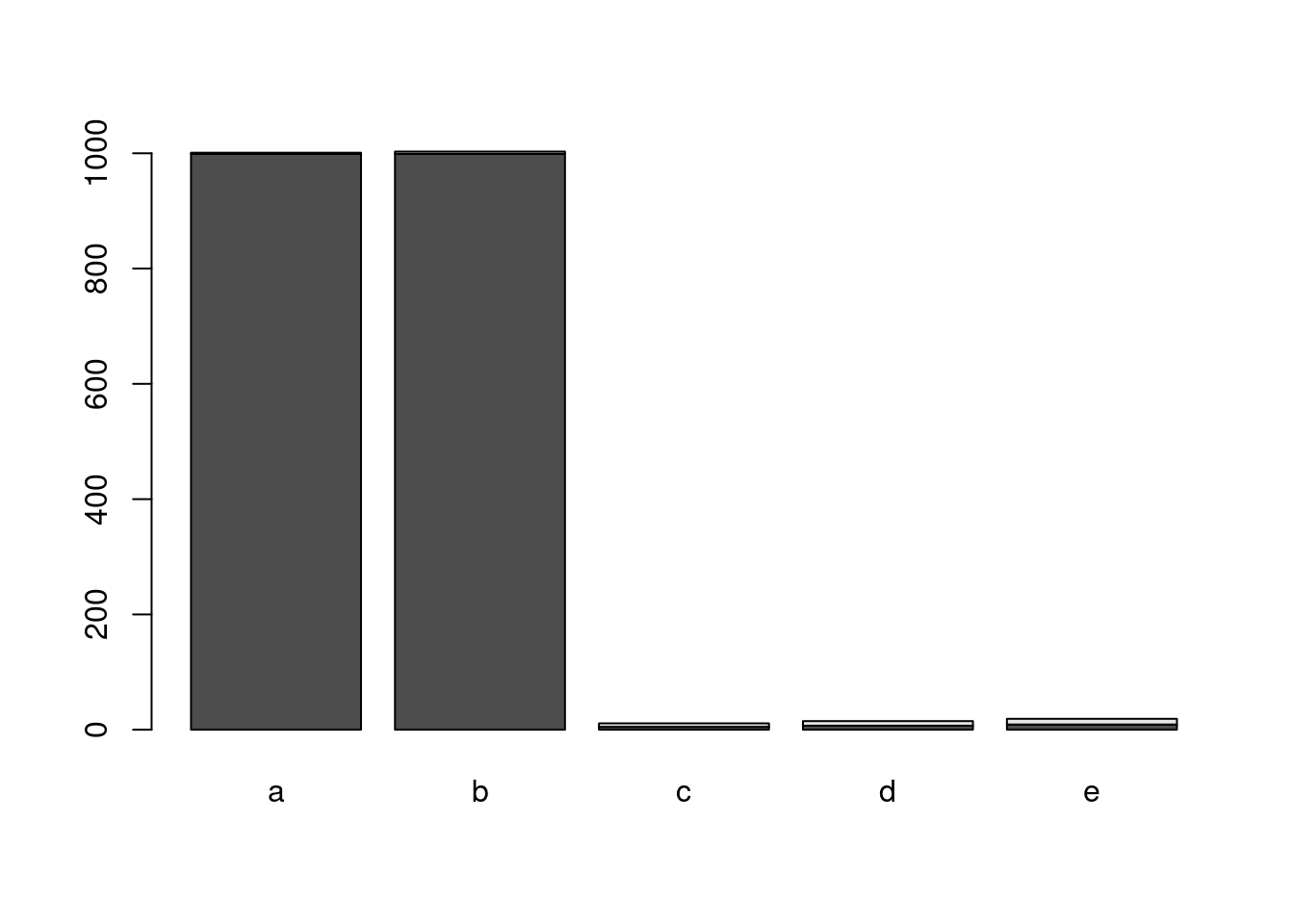
Define a graphical plotting method for new class and allow users to access it with R’s generic plot function.
7. Utilities to inspect methods
Important inspection methods for classes include:
showMethods(class="myclass")findMethods("randomize")getMethod("randomize", signature="myclass")existsMethod("randomize", signature="myclass")
Session Info
R version 4.5.1 (2025-06-13)
Platform: x86_64-pc-linux-gnu
Running under: Debian GNU/Linux 11 (bullseye)

Matrix products: default
BLAS:   /usr/lib/x86_64-linux-gnu/blas/libblas.so.3.9.0
LAPACK: /usr/lib/x86_64-linux-gnu/lapack/liblapack.so.3.9.0  LAPACK version 3.9.0

locale:
 [1] LC_CTYPE=en_US.UTF-8       LC_NUMERIC=C               LC_TIME=en_US.UTF-8        LC_COLLATE=en_US.UTF-8     LC_MONETARY=en_US.UTF-8    LC_MESSAGES=en_US.UTF-8    LC_PAPER=en_US.UTF-8       LC_NAME=C
 [9] LC_ADDRESS=C               LC_TELEPHONE=C             LC_MEASUREMENT=en_US.UTF-8 LC_IDENTIFICATION=C

time zone: America/Los_Angeles
tzcode source: system (glibc)

attached base packages:
[1] tools     stats     graphics  grDevices utils     datasets  methods   base

other attached packages:
[1] RColorBrewer_1.1-3 pheatmap_1.0.13

loaded via a namespace (and not attached):
 [1] digest_0.6.39     R6_2.6.1          codetools_0.2-20  fastmap_1.2.0     xfun_0.55         farver_2.1.2      gtable_0.3.6      glue_1.8.0        dichromat_2.0-0.1 knitr_1.51        htmltools_0.5.9   rmarkdown_2.30
[13] lifecycle_1.0.4   cli_3.6.5         scales_1.4.0      grid_4.5.1        vctrs_0.6.5       compiler_4.5.1    evaluate_1.0.5    yaml_2.3.12       otel_0.2.0        rlang_1.1.6       jsonlite_2.0.0    htmlwidgets_1.6.4