scRNA-Seq Embedding and Clustering Methods

Author

GEN242 Instructors

Published

May 21, 2026

Download qmd

Introduction

This tutorial introduces the usage of several software implementations of embedding and clustering algorithms for high-dimensional gene expression data (Duò, Robinson, and Soneson 2018) that are often used for single cell RNA-Seq (scRNA-Seq) data. Many of them are available as R packages on CRAN, Bioconductor and/or GitHub. Examples of embedding methods include PCA, MDS, SC3 (Kiselev et al. 2017), isomap, t-SNE (Donaldson and Donaldson 2010), FIt-SNE (Linderman et al. 2019), and UMAP (McInnes, Healy, and Melville 2018). In addition, some packages such as Bioconductor’s scater package provide in a single environment access to a wide range of embedding methods that can be conveniently and uniformly applied to Bioconductor’s S4 object class called SingleCellExperiment for handling scRNA-Seq data (Senabouth et al. 2019; Amezquita et al. 2020). The performance of the different embedding methods for scRNA-Seq data has been intensively tested by several studies, including Sun et al. (2019; 2020).

For illustration purposes, the example code for the embedding methods first applies four widely used methods to a bulk RNA-Seq data set (Howard et al. 2013), and then to a much more complex scRNA-Seq data set (Aztekin et al. 2019) obtained from the scRNAseq package.

Embedding of Bulk RNA-Seq data

Generate SummarizedExperiment and SingleCellExperiment

The following loads the bulk RNA-Seq data from Howard et al. (2013) into SummarizedExperiment and SingleCellExperiment objects. This is done by first creating a SummarizedExperiment object and then coercing it to a SingleCellExperiment object, as well as intializing the SingleCellExperiment directly.

The subsequent clustering steps are performed on single cell data only.

Create SummarizedExperiment and coerce to SingleCellExperiment

To work with this tutorial, download its qmd file (from here, or use blue QMD button above). In addition, download the required targetsPE.txt and countDFeByg.xls files from here to a new directory named results.

library(SummarizedExperiment); library(SingleCellExperiment)                                                                                                                        
targetspath <- "results/targetsPE.txt"                                                                                                                                                      
countpath <- "results/countDFeByg.xls"                                                                                                                                              
targets <- read.delim(targetspath, comment.char = "#")                                                                                                                              
rownames(targets) <- targets$SampleName                                                                                                                                             
countDF <- read.delim(countpath, row.names=1, check.names=FALSE)                                                                                                                    
(se <- SummarizedExperiment(assays=list(counts=countDF), colData=targets))                                                                                                          
class: SummarizedExperiment 
dim: 29699 18 
metadata(0):
assays(1): counts
rownames(29699): AT1G01010 AT1G01020 ... ATMG01400 ATMG01410
rowData names(0):
colnames(18): M1A M1B ... V12A V12B
colData names(7): FileName1 FileName2 ... Experiment Date
(sce <- as(se, "SingleCellExperiment"))
class: SingleCellExperiment 
dim: 29699 18 
metadata(0):
assays(1): counts
rownames(29699): AT1G01010 AT1G01020 ... ATMG01400 ATMG01410
rowData names(0):
colnames(18): M1A M1B ... V12A V12B
colData names(7): FileName1 FileName2 ... Experiment Date
reducedDimNames(0):
mainExpName: NULL
altExpNames(0):

Create SingleCellExperiment directly

sce2 <- SingleCellExperiment(assays=list(counts=countDF), colData=targets)

Prepare data for plotting with embedding methods

The data are preprocessed (_e.g._normalized) to plot them with the run embedding functions from the scran and scater packages.

library(scran); library(scater)
sce <- logNormCounts(sce)
colLabels(sce) <- factor(colData(sce)$Factor) # This uses replicate info from above targets file as pseudo-clusters

Embed with different methods and plot results

Note, the embedding results are sequentially appended to the SingleCellExperiment object, meaning one can use the plot function whenever necessary.

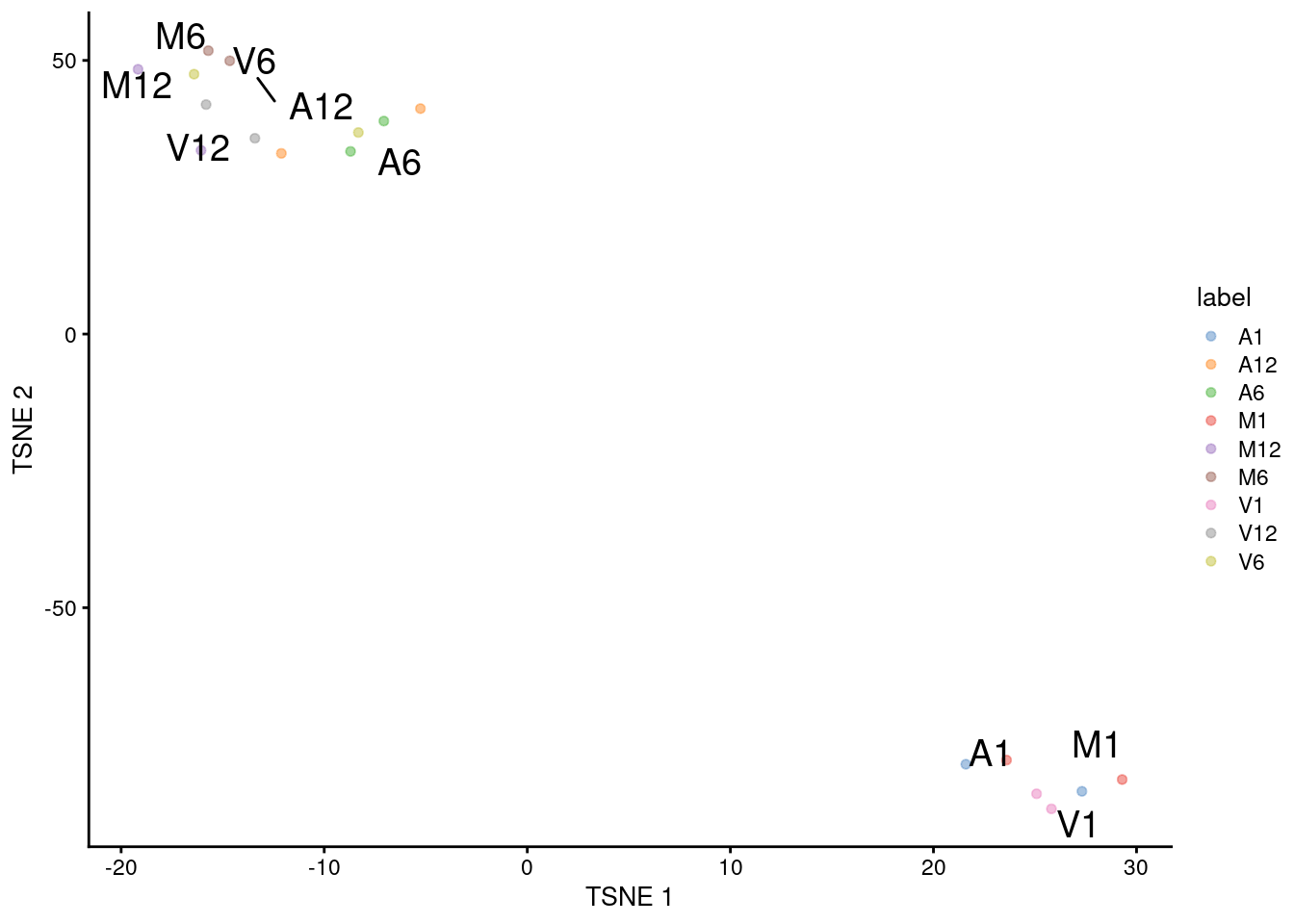
(a) tSNE

sce <- runTSNE(sce)
reducedDimNames(sce)
[1] "TSNE"
plotTSNE(sce, colour_by="label", text_by="label")

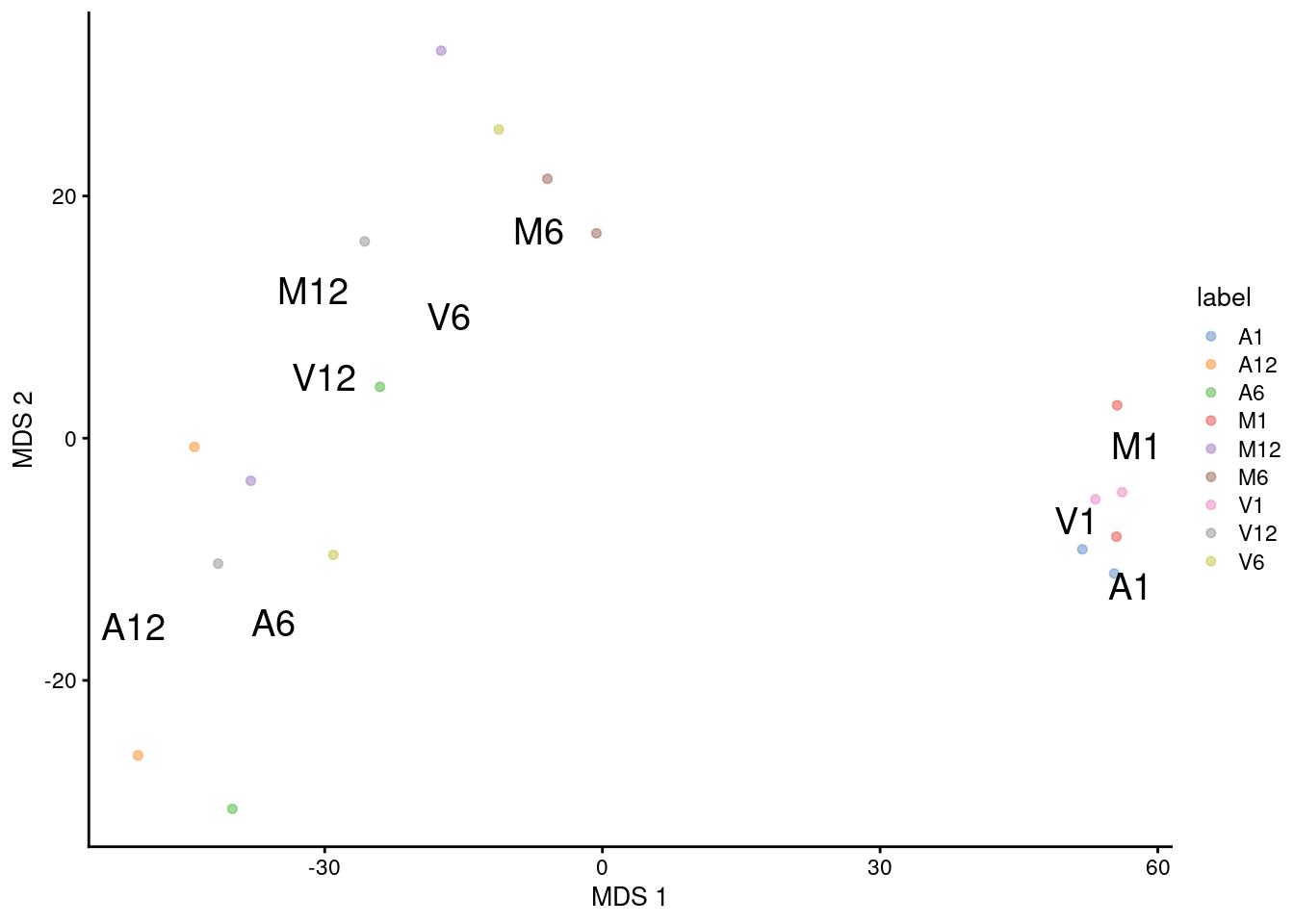
(b) MDS

sce <- runMDS(sce)
reducedDimNames(sce)
[1] "TSNE" "MDS" 
plotMDS(sce, colour_by="label", text_by="label")

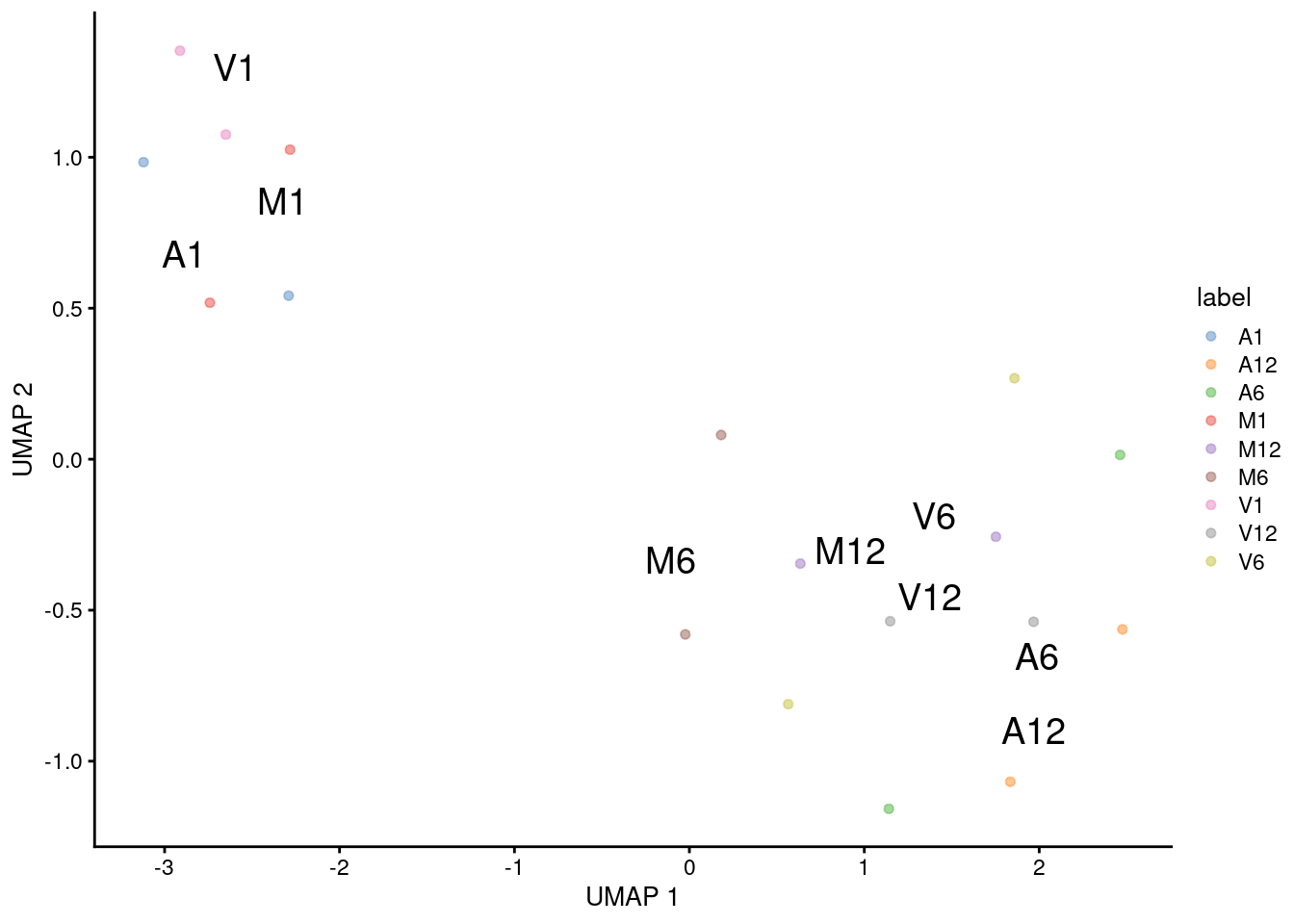
(c) UMAP

sce <- runUMAP(sce) 
reducedDimNames(sce)
[1] "TSNE" "MDS"  "UMAP"
plotUMAP(sce, colour_by="label", text_by="label")

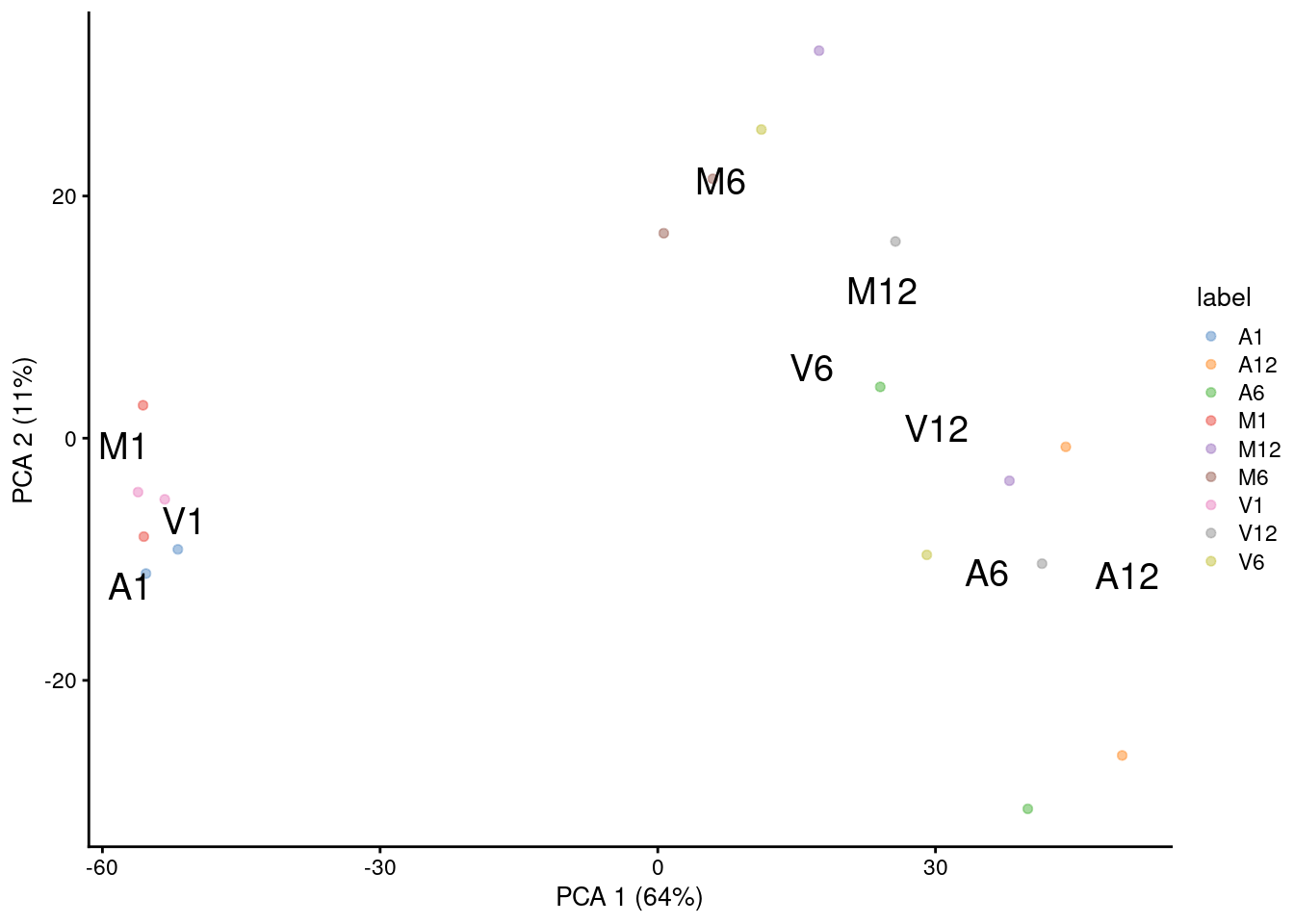
(d) PCA

PCA plot for first two components.

sce <- runPCA(sce) # gives a warning due to small size of data set but it still works 
reducedDimNames(sce)
[1] "TSNE" "MDS"  "UMAP" "PCA" 
plotPCA(sce, colour_by="label", text_by="label")

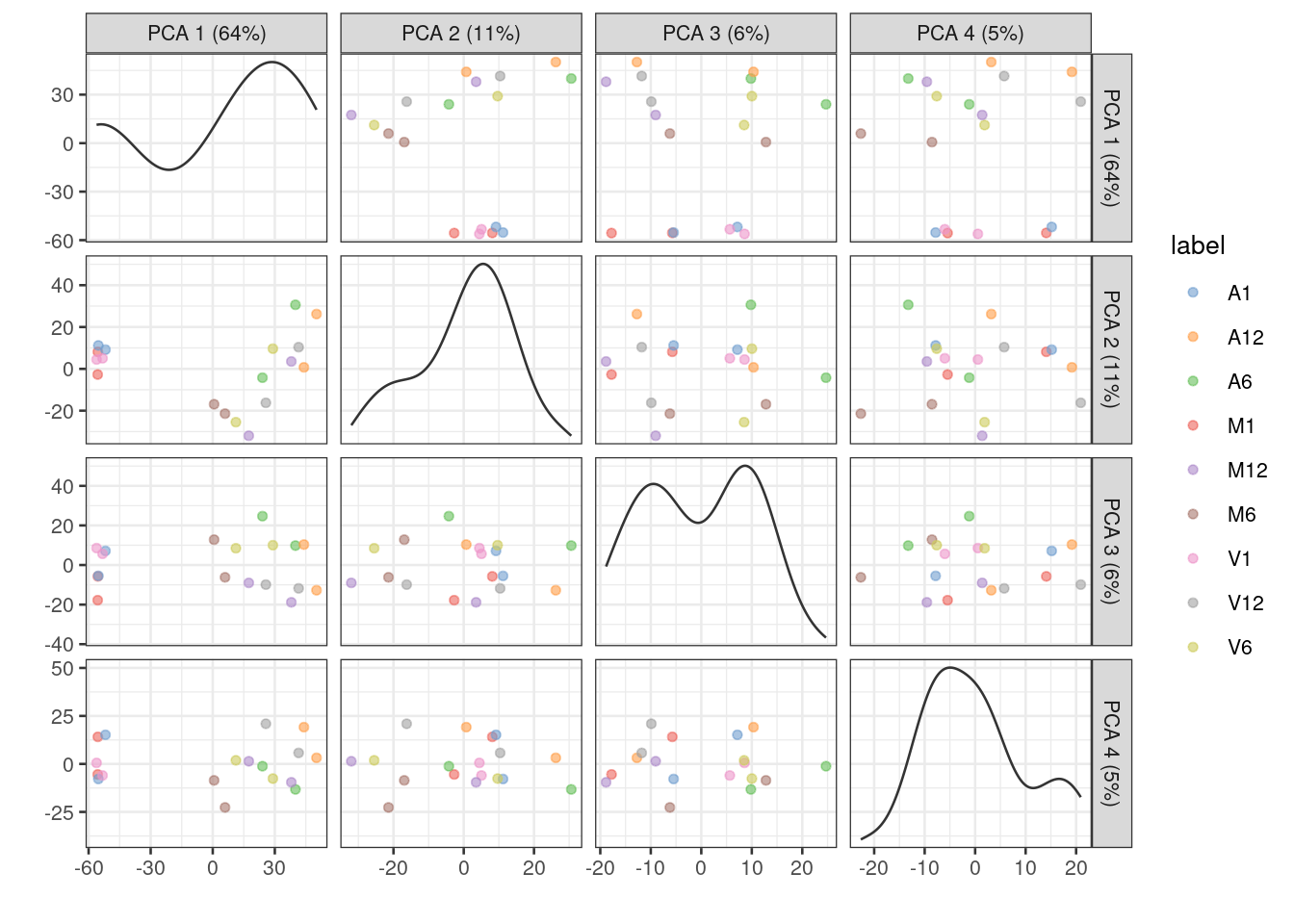
Multiple components can be plotted in a series of pairwise plots. When more than two components are plotted, the diagonal boxes in the scatter plot matrix show the density for each component.

sce <- runPCA(sce, ncomponents=20) # gives a warning due to small size of data set but it still works 
reducedDimNames(sce)
[1] "TSNE" "MDS"  "UMAP" "PCA" 
plotPCA(sce, colour_by="label", text_by="label", ncomponents = 4)

Embedding of scRNA-Seq data

Load scRNA-Seq data

The scRNAseq package is used to load the scRNA-Seq data set from Xenopus tail directly into a SingleCellExperiment object (Aztekin et al. 2019).

library(scRNAseq)
sce <- AztekinTailData()

Prepare data for plotting with embedding methods

Similarly as above, the data are preprocessed (_e.g._normalized) to plot them with the run embedding functions from the scran package. In addition, the data is clustered with the quickCluster function.

library(scran); library(scater)
sce <- logNormCounts(sce)
clusters <- quickCluster(sce)
# sce <- computeSumFactors(sce, clusters=clusters)
colLabels(sce) <- factor(clusters)
table(colLabels(sce))

To acclerate the testing performance of the following code, the size of the expression matrix is reduced to cell types with values \(\ge10^4\).

filter <- colSums(assays(sce)$counts) >= 10^4
sce <- sce[, filter]

To color items in the downstream dot plots by cell type instead of the above clustering result, one can use the cell type info under colData(). Note, this step is not evaluated here.

# colLabels(sce) <- colData(sce)$cluster

Embed with different methods and plot results

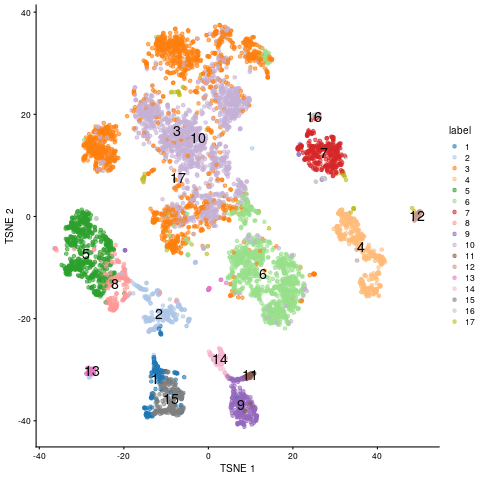
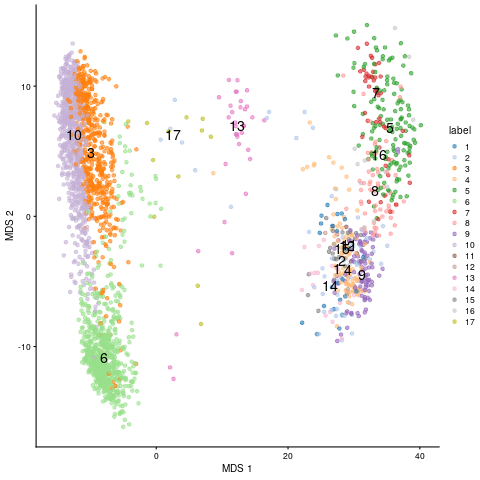
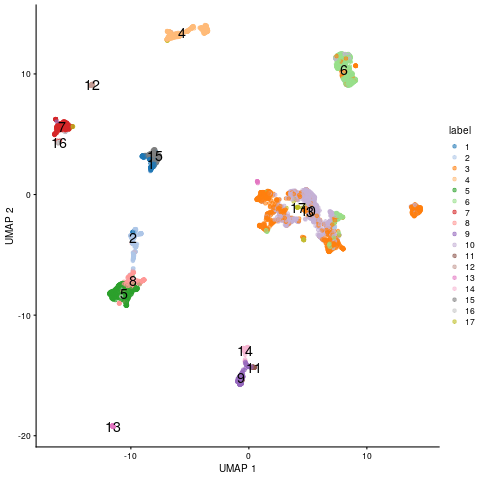
As under the bulk RNA-Seq section, the embedding results are sequentially appended to the SingleCellExperiment object, meaning one can use the plot function whenever necessary.

(a) tSNE

sce <- runTSNE(sce)
reducedDimNames(sce)
plotTSNE(sce, colour_by="label", text_by="label")

tSNE embedding of scRNA-Seq data.

(b) MDS

sce <- runMDS(sce)
reducedDimNames(sce)
plotMDS(sce, colour_by="label", text_by="label")

MDS embedding of scRNA-Seq data.

(c) UMAP

sce <- runUMAP(sce) # Note, the UMAP embedding is already stored in downloaded SingleCellExperiment object by authers. So one can just use this one or recompute it. 
reducedDimNames(sce)
plotUMAP(sce, colour_by="label", text_by="label")

UMAP embedding of scRNA-Seq data.

(d) PCA

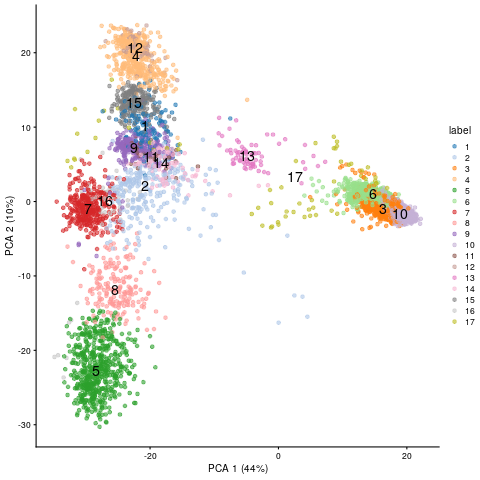
PCA result plotted for first two components.

sce <- runPCA(sce) 
reducedDimNames(sce)
plotPCA(sce, colour_by="label", text_by="label")

PCA embedding of scRNA-Seq data.

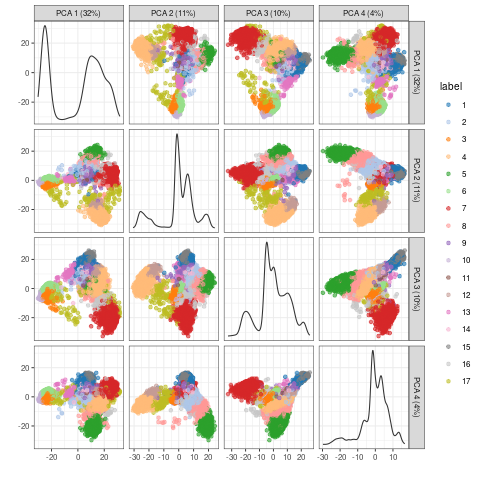
Multiple components can be plotted in a series of pairwise plots. When more than two components are plotted, the diagonal boxes in the scatter plot matrix show the density for each component.

sce <- runPCA(sce, ncomponents=20) 
reducedDimNames(sce)
plotPCA(sce, colour_by="label", text_by="label", ncomponents = 4)

PCA embedding of scRNA-Seq data for multiple components.

Clustering for Single-Cell RNA-Seq Data

Background

Single-cell RNA-Seq (scRNA-Seq) data presents unique challenges for clustering: datasets commonly contain thousands to millions of cells, expression matrices are highly sparse (most genes have zero counts per cell), and the goal is to identify cell type populations from transcriptomic profiles rather than replicate groups.

For this reason, classical hierarchical or k-means clustering are rarely applied directly to scRNA-Seq data. Instead, the standard workflow proceeds as:

  1. Normalize and log-transform the count matrix
  2. Select highly variable genes (HVGs) to reduce noise
  3. Apply PCA to compress into 20–50 principal components
  4. Build a k-nearest neighbor (KNN) graph in PCA space
  5. Cluster cells with a graph-based algorithm (Louvain or Leiden)
  6. Visualize clusters with UMAP (or tSNE)

Graph-Based Clustering: Louvain and Leiden Algorithms

Both algorithms operate on the same graph structure:

  • KNN graph construction: Each cell becomes a node. Edges connect each cell to its k most similar neighbors (typically k=20) in PCA-reduced space.
  • SNN refinement: The KNN graph is refined into a Shared Nearest Neighbor (SNN) graph where edge weights reflect the Jaccard similarity of shared neighbors, making the graph robust to differences in local density.
  • Modularity optimization: The algorithm partitions cells into communities by maximizing modularity Q — a measure of how many edges fall within clusters versus the random expectation.

Louvain (Blondel et al. 2008) is fast and widely used, but can produce poorly-connected communities as a side effect of its greedy optimization. Leiden (Traag et al. 2019) corrects this with an additional refinement phase that guarantees well-connected, more stable communities. Leiden is generally preferred for new analyses.

The resolution parameter (default 0.5–1.0) controls cluster granularity: higher values yield more, smaller clusters. The number of clusters does not need to be specified in advance.

UMAP for Visualization

UMAP (Uniform Manifold Approximation and Projection; McInnes et al. 2018) is used to embed high-dimensional PCA coordinates into 2D for visualization. It constructs a fuzzy topological graph of the data, then optimizes a low-dimensional layout that preserves local and global graph structure.

Important: Clustering is always performed on PCA or SNN graph coordinates, not on UMAP coordinates. UMAP is a visualization tool only — inter-cluster distances in the UMAP plot are not quantitatively meaningful.

UMAP advantages over tSNE for scRNA-Seq:

  • Faster and scales to millions of cells
  • Better preserves global structure (relative positions of clusters are more meaningful)
  • Supports embedding of new cells into an existing layout
  • More reproducible given the same random seed

Both UMAP and tSNE are stochastic; always use set.seed() for reproducibility.

Clustering Exercises: scRNA-Seq Data

The following exercises use the Bioconductor scRNAseq package to load a real scRNA-Seq dataset, and apply graph-based clustering via the scran/bluster ecosystem, which integrates with SingleCellExperiment objects.

Install and load required packages

library(scran)
library(scater)
library(bluster)
library(scRNAseq)
library(SingleCellExperiment)

Load scRNA-Seq dataset

We use the Zeisel mouse brain dataset (3005 cells, 19972 genes), a classic benchmark for scRNA-Seq clustering. Cell type labels are included for validation.

# Load dataset (~30 MB download on first use; cached thereafter)
sce <- ZeiselBrainData()
sce
class: SingleCellExperiment 
dim: 20006 3005 
metadata(0):
assays(1): counts
rownames(20006): Tspan12 Tshz1 ... mt-Rnr1 mt-Nd4l
rowData names(1): featureType
colnames(3005): 1772071015_C02 1772071017_G12 ... 1772066098_A12 1772058148_F03
colData names(9): tissue group # ... level1class level2class
reducedDimNames(0):
mainExpName: gene
altExpNames(2): repeat ERCC
## class: SingleCellExperiment
## dim: 19972 3005
## ...
## colData names(10): tissue group # ... level1class level2class

Data preprocessing

# 1. Remove lowly expressed genes (keep genes detected in >= 10 cells)
keep <- rowSums(counts(sce) > 0) >= 10
sce <- sce[keep, ]

# 2. Normalize using scran's pooling-based size factor estimation
set.seed(42)
clusters_quick <- quickCluster(sce)
sce <- computeSumFactors(sce, clusters = clusters_quick)
sce <- logNormCounts(sce)

# 3. Select highly variable genes (top 2000 HVGs)
dec <- modelGeneVar(sce)
hvgs <- getTopHVGs(dec, n = 2000)
cat("Number of HVGs selected:", length(hvgs), "\n")
Number of HVGs selected: 2000 

Dimensionality reduction with PCA

# Run PCA on HVGs (50 components)
set.seed(42)
sce <- runPCA(sce, ncomponents = 50, subset_row = hvgs)

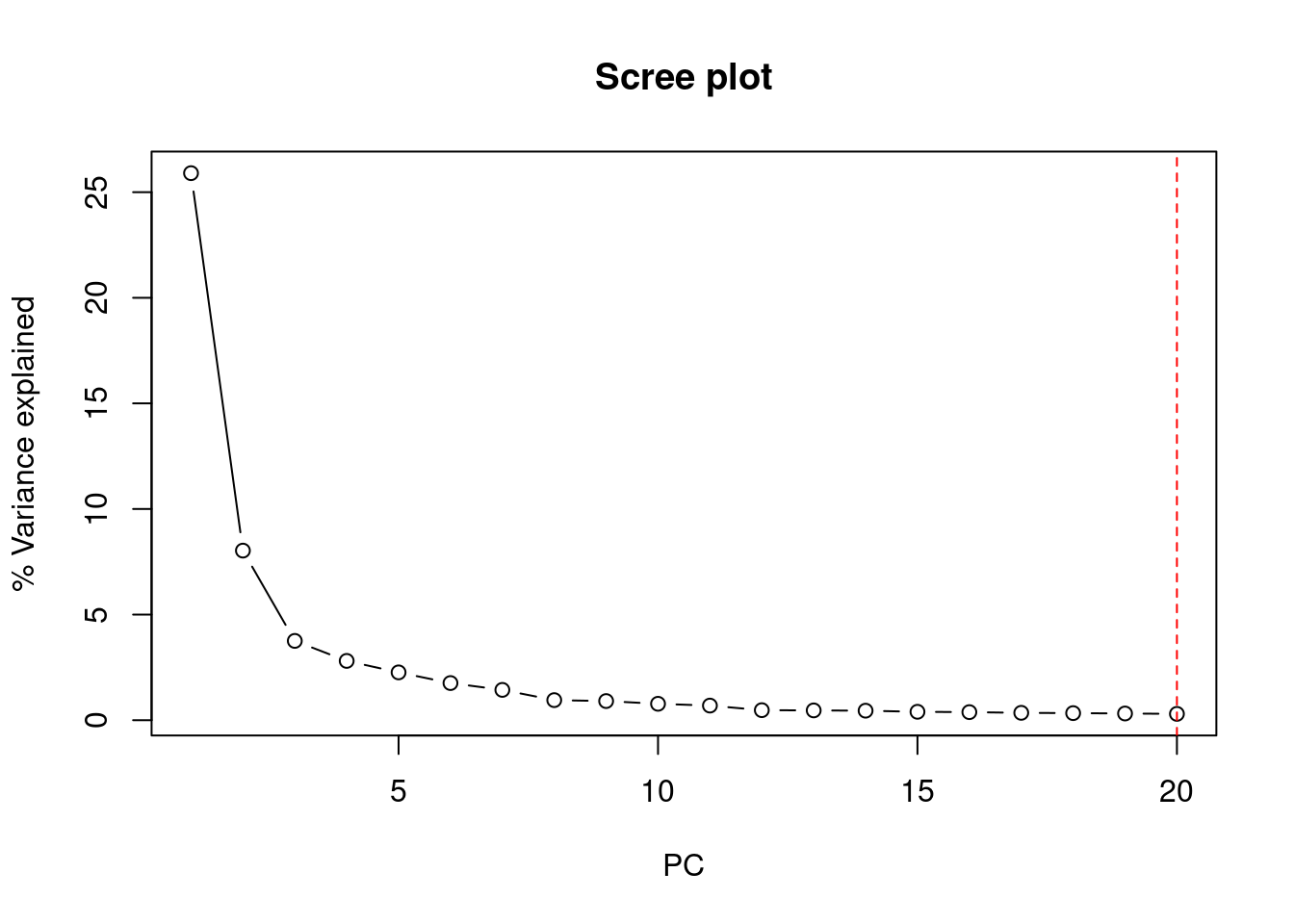
# Inspect variance explained
pct_var <- attr(reducedDim(sce, "PCA"), "percentVar")
plot(pct_var[1:20], type = "b", xlab = "PC", ylab = "% Variance explained",
     main = "Scree plot")
abline(v = 20, lty = 2, col = "red")  # Typical cutoff around 20-30 PCs

Graph-based clustering with Louvain algorithm

# Build SNN graph and cluster with Louvain (via igraph under the hood)
# Build SNN graph and cluster with Louvain algorithm
set.seed(42)
clust_out <- clusterCells(sce,
                           use.dimred = "PCA",
                           BLUSPARAM = SNNGraphParam(
                               k = 20,
                               type = "rank",
                               cluster.fun = "louvain",
                               cluster.args = list(resolution = 0.8)
                           ),
                           full = TRUE)

# Extract cluster vector from the full output and store
colLabels(sce) <- clust_out$clusters
table(colLabels(sce))

  1   2   3   4   5   6   7   8   9 
279 715 173 391 247 246 133 732  89 
#### Graph-based clustering with Leiden algorithm (preferred)
# Leiden requires the igraph package with leiden support
# Note: cluster.fun = "leiden" is available in bluster >= 1.6
set.seed(42)
clust_leiden <- clusterCells(sce,
                              use.dimred = "PCA",
                              BLUSPARAM = SNNGraphParam(
                                  k = 20,
                                  type = "rank",
                                  cluster.fun = "leiden",
                                  cluster.args = list(
                                      objective_function = "modularity",
                                      resolution_parameter = 0.5
                                  )
                              ))

colData(sce)$leiden_cluster <- clust_leiden
table(sce$leiden_cluster)

  1   2   3   4   5   6   7 
286 168 900 173 390 352 736 

UMAP visualization

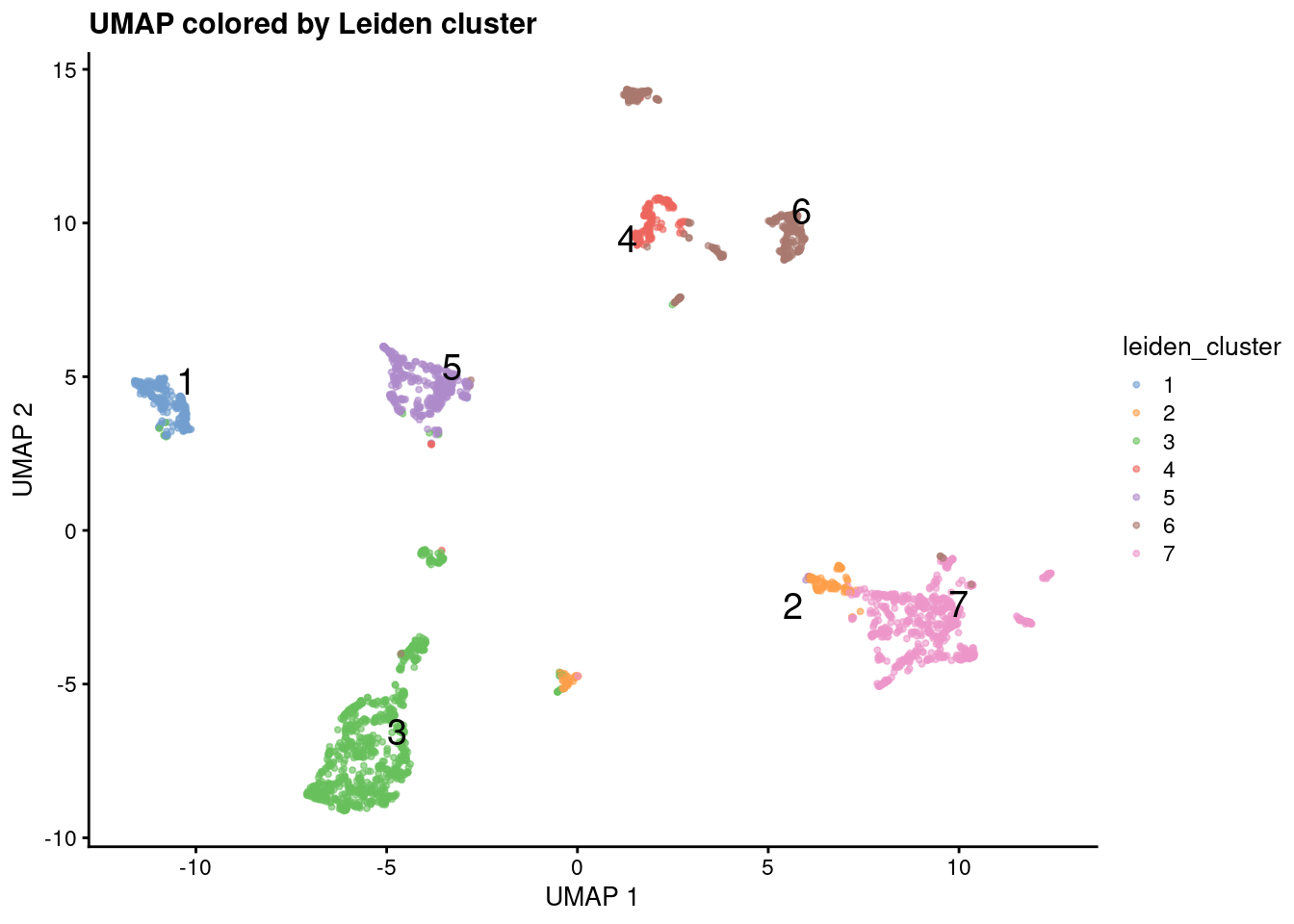
# Run UMAP on the first 20 PCs (use set.seed for reproducibility)
set.seed(42)
sce <- runUMAP(sce, dimred = "PCA", n_dimred = 20)

# Plot cells colored by Leiden cluster
plotReducedDim(sce, dimred = "UMAP",
               colour_by = "leiden_cluster",
               text_by = "leiden_cluster",
               point_size = 0.8) +
  ggtitle("UMAP colored by Leiden cluster")

Validate clusters against known cell type labels

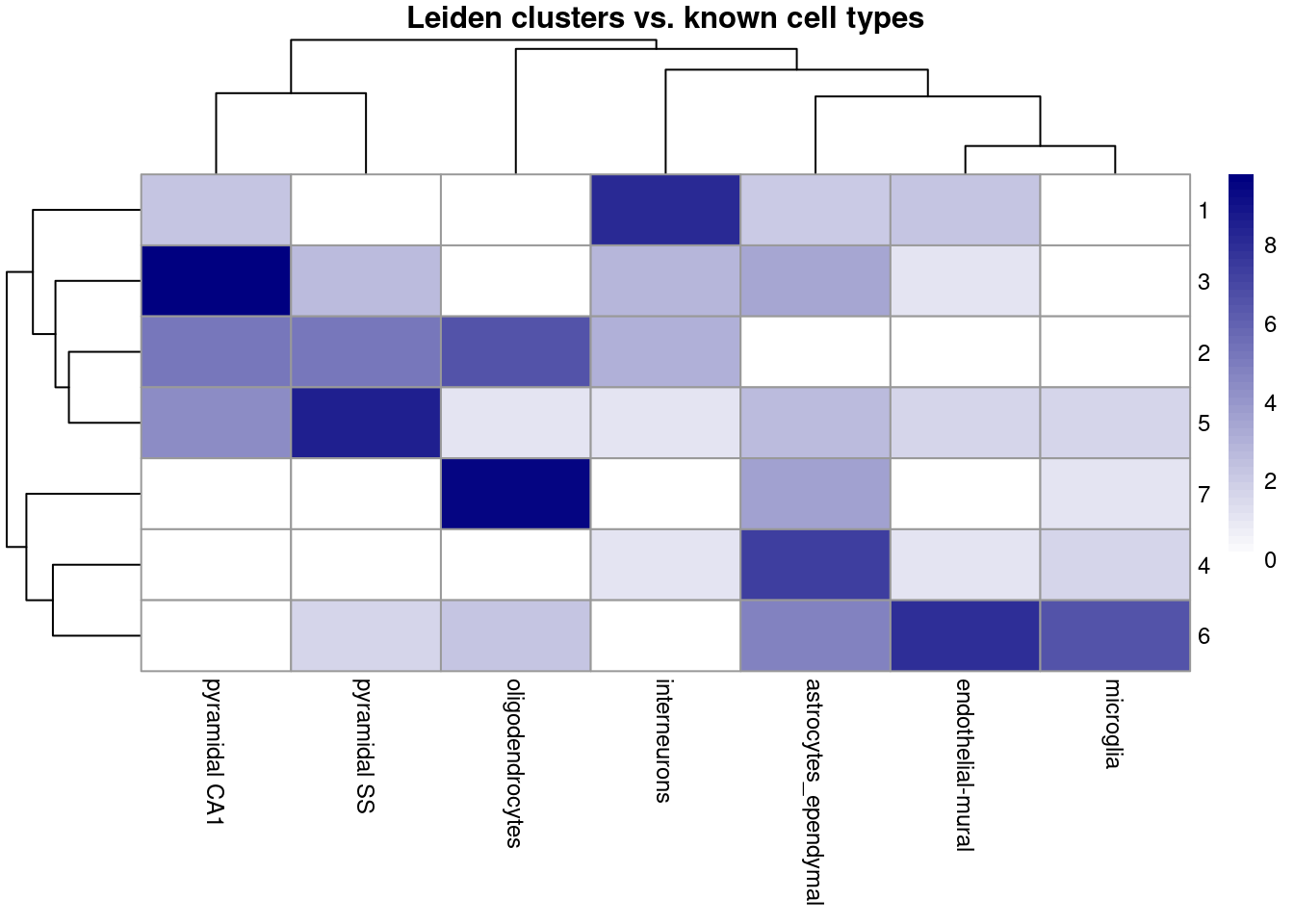
The Zeisel dataset includes expert-annotated cell types in colData(sce)$level1class. We can assess how well our unsupervised clusters recover known biology:

# Contingency table: clusters vs. known cell types
tab <- table(cluster = sce$leiden_cluster,
             cell_type = sce$level1class)
tab
       cell_type
cluster astrocytes_ependymal endothelial-mural interneurons microglia oligodendrocytes pyramidal CA1 pyramidal SS
      1                    3                 4          275         0                0             4            0
      2                    0                 0            7         0               91            37           33
      3                   10                 1            6         0                0           878            5
      4                  169                 1            1         2                0             0            0
      5                    5                 2            1         2                1            20          359
      6                   26               227            0        93                4             0            2
      7                   11                 0            0         1              724             0            0
# Heatmap visualization of cluster-to-cell-type correspondence
pheatmap::pheatmap(
    log2(tab + 1),
    color = colorRampPalette(c("white", "navy"))(50),
    fontsize = 9,
    main = "Leiden clusters vs. known cell types"
)

Effect of resolution parameter

The resolution parameter is the key tuning choice in graph-based clustering. Lower values give fewer, broader clusters; higher values give more, finer clusters.

# Compare cluster counts at different resolutions
resolutions <- c(0.2, 0.5, 0.8, 1.2, 2.0)

n_clusters <- sapply(resolutions, function(res) {
    set.seed(42)
    cl <- clusterCells(sce,
                       use.dimred = "PCA",
                       BLUSPARAM = SNNGraphParam(
                           k = 20,
                           type = "rank",
                           cluster.fun = "louvain",
                           cluster.args = list(resolution = res)
                       ))
    nlevels(factor(cl))
})

data.frame(resolution = resolutions, n_clusters = n_clusters)

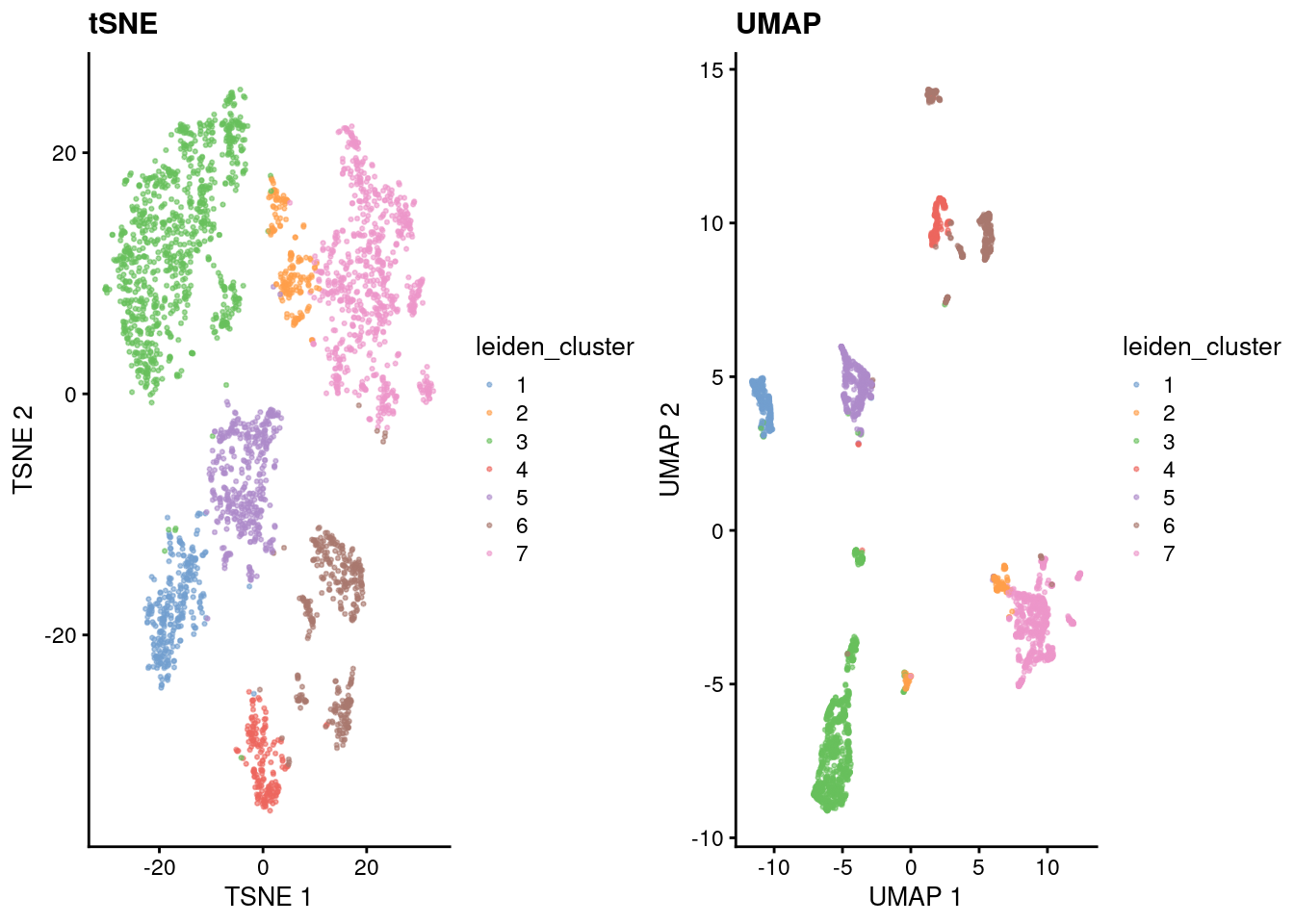
tSNE vs UMAP comparison

# Also run tSNE for comparison
set.seed(42)
sce <- runTSNE(sce, dimred = "PCA", n_dimred = 20)

# Side-by-side comparison
library(gridExtra)
p1 <- plotReducedDim(sce, "TSNE", colour_by = "leiden_cluster",
                     point_size = 0.5) + ggtitle("tSNE")
p2 <- plotReducedDim(sce, "UMAP", colour_by = "leiden_cluster",
                     point_size = 0.5) + ggtitle("UMAP")
grid.arrange(p1, p2, ncol = 2)

Find cluster marker genes

After clustering, marker genes per cluster are identified to support cell type annotation:

# Find marker genes for each cluster (using Wilcoxon test by default)
markers <- findMarkers(sce,
                       groups = sce$leiden_cluster,
                       test.type = "wilcox",
                       direction = "up",    # upregulated in cluster
                       lfc = 1)             # log2 fold-change threshold

# Inspect top 10 markers for cluster 1
markers[[1]][1:10, c("Top", "p.value", "FDR")]
DataFrame with 10 rows and 3 columns
             Top      p.value          FDR
       <integer>    <numeric>    <numeric>
Gad1           1 9.19801e-200 1.51620e-195
Gad2           1 5.38996e-198 4.44241e-194
Mllt11         3 1.70159e-115 1.16871e-112
Ndrg4          3 1.94253e-157 8.97719e-154
Slc6a1         3 6.72010e-157 2.21548e-153
Stmn3          3 4.81616e-150 1.13414e-146
Nap1l5         4  9.36772e-83  2.14469e-80
Rcan2          4 1.99960e-134 2.35438e-131
Rab3c          4 2.65833e-155 7.30333e-152
Atp1a3         4 2.17840e-157 8.97719e-154

Version Information

sessionInfo()
R version 4.5.1 (2025-06-13)
Platform: x86_64-pc-linux-gnu
Running under: Debian GNU/Linux 11 (bullseye)

Matrix products: default
BLAS:   /usr/lib/x86_64-linux-gnu/blas/libblas.so.3.9.0 
LAPACK: /usr/lib/x86_64-linux-gnu/lapack/liblapack.so.3.9.0  LAPACK version 3.9.0

locale:
 [1] LC_CTYPE=en_US.UTF-8       LC_NUMERIC=C               LC_TIME=en_US.UTF-8        LC_COLLATE=en_US.UTF-8     LC_MONETARY=en_US.UTF-8    LC_MESSAGES=en_US.UTF-8    LC_PAPER=en_US.UTF-8       LC_NAME=C                 
 [9] LC_ADDRESS=C               LC_TELEPHONE=C             LC_MEASUREMENT=en_US.UTF-8 LC_IDENTIFICATION=C       

time zone: America/Los_Angeles
tzcode source: system (glibc)

attached base packages:
[1] stats4    stats     graphics  grDevices utils     datasets  methods   base     

other attached packages:
 [1] gridExtra_2.3               scRNAseq_2.24.0             bluster_1.20.0              scater_1.38.1               ggplot2_4.0.2               scran_1.38.1                scuttle_1.20.0             
 [8] SingleCellExperiment_1.32.0 SummarizedExperiment_1.40.0 Biobase_2.70.0              GenomicRanges_1.62.1        Seqinfo_1.0.0               IRanges_2.44.0              S4Vectors_0.48.1           
[15] BiocGenerics_0.56.0         generics_0.1.4              MatrixGenerics_1.22.0       matrixStats_1.5.0          

loaded via a namespace (and not attached):
  [1] RColorBrewer_1.1-3       jsonlite_2.0.0           magrittr_2.0.5           gypsum_1.6.0             ggbeeswarm_0.7.3         GenomicFeatures_1.62.0   farver_2.1.2             rmarkdown_2.31          
  [9] BiocIO_1.20.0            vctrs_0.7.3              memoise_2.0.1            Rsamtools_2.26.0         RCurl_1.98-1.18          htmltools_0.5.9          S4Arrays_1.10.1          AnnotationHub_4.0.0     
 [17] curl_7.0.0               BiocNeighbors_2.4.0      Rhdf5lib_1.32.0          SparseArray_1.10.10      rhdf5_2.54.1             alabaster.base_1.10.0    alabaster.sce_1.10.0     htmlwidgets_1.6.4       
 [25] httr2_1.2.2              cachem_1.1.0             GenomicAlignments_1.46.0 igraph_2.2.3             lifecycle_1.0.5          pkgconfig_2.0.3          rsvd_1.0.5               Matrix_1.7-5            
 [33] R6_2.6.1                 fastmap_1.2.0            digest_0.6.39            AnnotationDbi_1.72.0     dqrng_0.4.1              RSpectra_0.16-2          irlba_2.3.7              ExperimentHub_3.0.0     
 [41] RSQLite_2.4.6            beachmat_2.26.0          filelock_1.0.3           labeling_0.4.3           httr_1.4.8               abind_1.4-8              compiler_4.5.1           bit64_4.6.0-1           
 [49] withr_3.0.2              S7_0.2.1-1               BiocParallel_1.44.0      viridis_0.6.5            DBI_1.3.0                alabaster.ranges_1.10.0  HDF5Array_1.38.0         alabaster.schemas_1.10.0
 [57] rappdirs_0.3.4           DelayedArray_0.36.1      rjson_0.2.23             tools_4.5.1              vipor_0.4.7              otel_0.2.0               beeswarm_0.4.0           glue_1.8.1              
 [65] h5mread_1.2.1            restfulr_0.0.16          rhdf5filters_1.22.0      grid_4.5.1               Rtsne_0.17               cluster_2.1.8.2          gtable_0.3.6             ensembldb_2.34.0        
 [73] BiocSingular_1.26.1      ScaledMatrix_1.18.0      metapod_1.18.0           XVector_0.50.0           ggrepel_0.9.8            BiocVersion_3.22.0       pillar_1.11.1            limma_3.66.0            
 [81] dplyr_1.2.1              BiocFileCache_3.0.0      lattice_0.22-7           FNN_1.1.4.1              rtracklayer_1.70.1       bit_4.6.0                tidyselect_1.2.1         locfit_1.5-9.12         
 [89] Biostrings_2.78.0        knitr_1.51               ProtGenerics_1.42.0      edgeR_4.8.2              xfun_0.57                statmod_1.5.1            pheatmap_1.0.13          UCSC.utils_1.6.1        
 [97] lazyeval_0.2.3           yaml_2.3.12              evaluate_1.0.5           codetools_0.2-20         cigarillo_1.0.0          tibble_3.3.1             alabaster.matrix_1.10.0  BiocManager_1.30.27     
[105] cli_3.6.6                uwot_0.2.4               GenomeInfoDb_1.46.2      dichromat_2.0-0.1        Rcpp_1.1.1-1             dbplyr_2.5.2             png_0.1-9                XML_3.99-0.23           
[113] parallel_4.5.1           blob_1.3.0               AnnotationFilter_1.34.0  bitops_1.0-9             alabaster.se_1.10.0      viridisLite_0.4.3        scales_1.4.0             crayon_1.5.3            
[121] rlang_1.2.0              cowplot_1.2.0            KEGGREST_1.50.0         
Back to top

References

Amezquita, Robert A, Aaron T L Lun, Etienne Becht, Vince J Carey, Lindsay N Carpp, Ludwig Geistlinger, Federico Marini, et al. 2020. Orchestrating single-cell analysis with Bioconductor.” Nat. Methods 17 (2): 137–45. https://doi.org/10.1038/s41592-019-0654-x.
Aztekin, C, T W Hiscock, J C Marioni, J B Gurdon, B D Simons, and J Jullien. 2019. Identification of a regeneration-organizing cell in the Xenopus tail.” Science 364 (6441): 653–58. https://doi.org/10.1126/science.aav9996.
Donaldson, Justin, and Maintainer Justin Donaldson. 2010. “Package ‘Tsne’.” CRAN Repository.
Duò, Angelo, Mark D Robinson, and Charlotte Soneson. 2018. A systematic performance evaluation of clustering methods for single-cell RNA-seq data.” F1000Res. 7 (July): 1141. https://doi.org/10.12688/f1000research.15666.3.
Howard, Brian E, Qiwen Hu, Ahmet Can Babaoglu, Manan Chandra, Monica Borghi, Xiaoping Tan, Luyan He, et al. 2013. “High-Throughput RNA Sequencing of Pseudomonas-Infected Arabidopsis Reveals Hidden Transcriptome Complexity and Novel Splice Variants.” PLoS One 8 (10): e74183. https://doi.org/10.1371/journal.pone.0074183.
Kiselev, Vladimir Yu, Kristina Kirschner, Michael T Schaub, Tallulah Andrews, Andrew Yiu, Tamir Chandra, Kedar N Natarajan, et al. 2017. SC3: consensus clustering of single-cell RNA-seq data.” Nat. Methods 14 (5): 483–86. https://doi.org/10.1038/nmeth.4236.
Linderman, George C, Manas Rachh, Jeremy G Hoskins, Stefan Steinerberger, and Yuval Kluger. 2019. Fast interpolation-based t-SNE for improved visualization of single-cell RNA-seq data.” Nat. Methods 16 (3): 243–45. https://doi.org/10.1038/s41592-018-0308-4.
McInnes, Leland, John Healy, and James Melville. 2018. UMAP: Uniform Manifold Approximation and Projection for Dimension Reduction,” February. http://arxiv.org/abs/1802.03426.
Senabouth, Anne, Samuel W Lukowski, Jose Alquicira Hernandez, Stacey B Andersen, Xin Mei, Quan H Nguyen, and Joseph E Powell. 2019. ascend: R package for analysis of single-cell RNA-seq data.” Gigascience 8 (8). https://doi.org/10.1093/gigascience/giz087.
Sun, Shiquan, Jiaqiang Zhu, Ying Ma, and Xiang Zhou. 2019. Accuracy, robustness and scalability of dimensionality reduction methods for single-cell RNA-seq analysis.” Genome Biol. 20 (1): 269. https://doi.org/10.1186/s13059-019-1898-6.
Sun, Shiquan, Jiaqiang Zhu, and Xiang Zhou. 2020. Statistical analysis of spatial expression patterns for spatially resolved transcriptomic studies.” Nat. Methods, January. https://doi.org/10.1038/s41592-019-0701-7.